Like most developers you use maybe 10% of what Claude Code can actually do.
You probably ask it to write a function. It does. You paste it somewhere. Ask for the next piece, paste again, keep going until something works.
That’s copilot mode. You’re driving. AI is a faster typewriter.
Claude Code isn’t a copilot. It’s an agent. The difference: an agent executes multi-step work on its own while you verify and steer. You set up the right environment, then get out of the way.
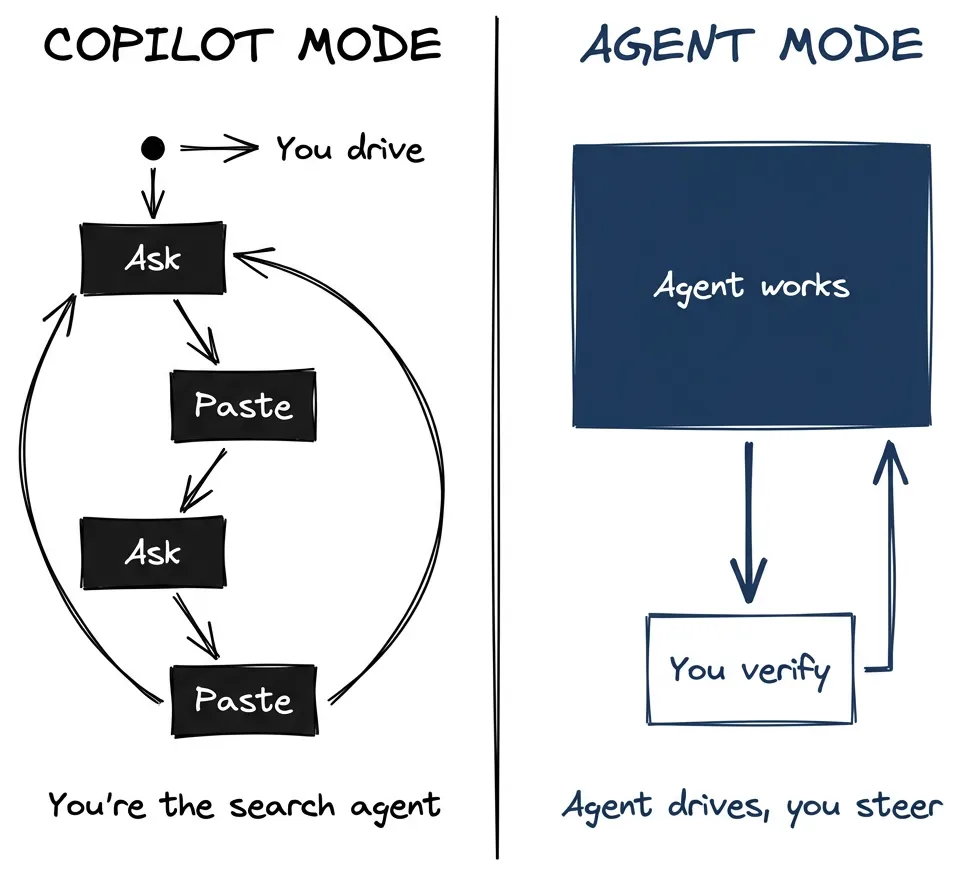
Most developers I’ve seen never make this shift. Not because they don’t want to. They try something new, it doesn’t quite work, they revert to what worked before. Makes sense. You work a full day. You don’t have hours to experiment with productivity tools. You spend time on experiments hoping to save time later, but if you don’t see savings quickly, it feels like spinning wheels. The AI slop keeps multiplying. Why do this to yourself?
I’ve been running agentic workflows for almost a year now. Rebuilding internal tools. Writing this blog. Analyzing legacy codebases I’d never touched. And with the model improvements over the last few months, more people are asking: what environment does the agent actually need to work on its own?
The answer is simpler than you’d think. Close the loop. Let it do its job with full knowledge. Five things make this work. Get them in place and you unlock most of the capability. The rest is project-specific.
The Five Pillars
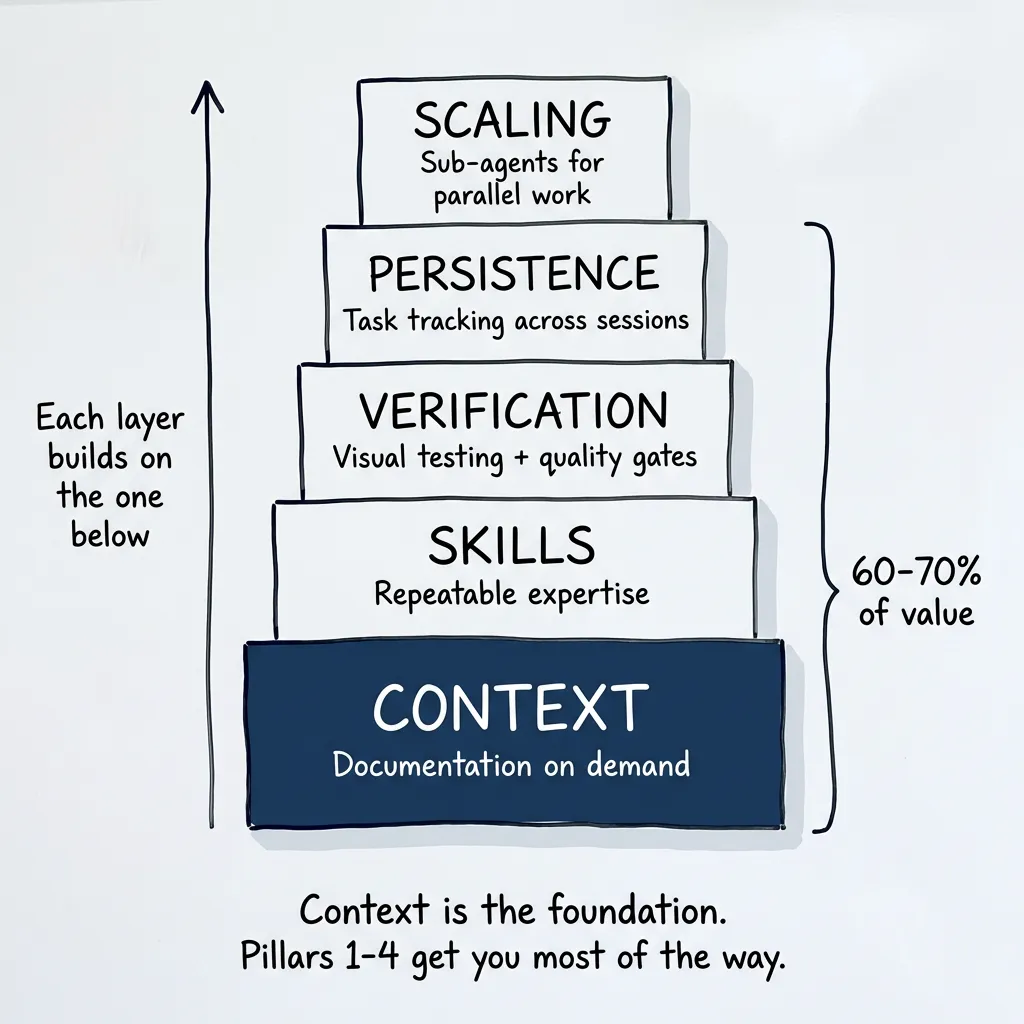
Each layer builds on the one below. Context is the foundation. Pillars 1-4 get you most of the way.
Pillar 1: Context
Ask Claude to implement something in a framework it doesn’t know well. It invents a solution. Works, kind of. You notice something’s off.
So you say: “Go research best practices for this.” Or you paste a link to the documentation. It reads it, adjusts, gets it right. Session saved.
Then compaction happens. Or you close the session. Tomorrow you want to do something similar.
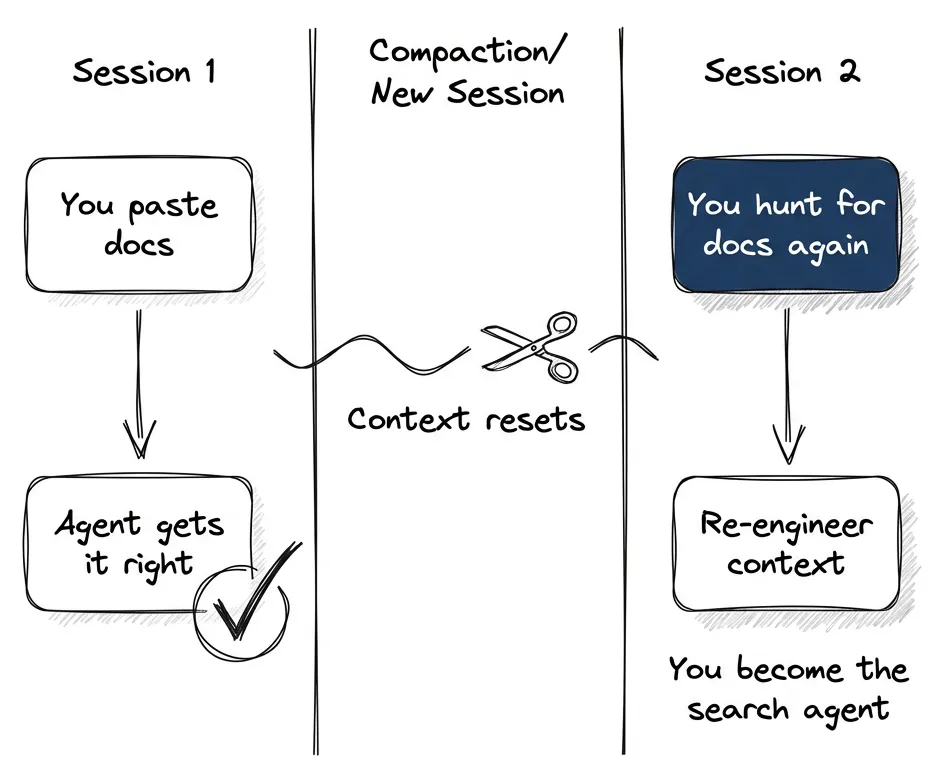
Now you’re the search agent. Hunting down the same docs, re-engineering the context, prompting links you already gave yesterday. You can do it (like a manager bringing pizza for the development team) but it’s not the best way to work.
Ref fixes this. It’s an MCP server that gives the agent documentation on demand. (Part 2 covers MCP setup in detail.) One command:
claude mcp add --transport http Ref https://api.ref.tools/mcp --header "x-ref-api-key:YOUR_KEY"Restart Claude Code. Done.
Now when I ask Claude to implement Astro content collections, it searches the docs first. Svelte stores? Checks the docs. The proper solution instead of an invented one.
Config alone isn’t enough. You enforce the behavior in CLAUDE.md:
Anti-pattern (FORBIDDEN):
❌ See error → Guess fix → Apply patch → Hope it worksRequired pattern:
✅ See error → Search Ref docs → Understand root cause → Apply proper fixThe agent can’t look up docs it doesn’t know exist. Give it a way to search.
Alternatives
Ref isn’t the only option:
- Context7 by Upstash: Great for version-specific documentation snippets and code examples. Setup:
claude mcp add context7 -- npx -y @upstash/context7-mcp - Ref: Finds exactly the documentation section you need — saves more context.
- DeepWiki by Cognition: Free MCP covering 50,000+ open source repositories. No API key needed. Great demo of powerful RAG for codebases — proprietary tech from Devin, but free for open source.
All three work. Pick one and start.
Pillar 2: Skills
A prompt is a one-time instruction. A skill is repeatable expertise.
Every time you want good frontend code, you explain what “good” means. Semantic HTML. Accessibility. Design system. Avoid that generic AI look. That’s a lot to remember. You’ll forget half of it.
Skills package that expertise. When I’m working on UI, I tell Claude to “use frontend-design skills” and it loads everything it needs: design principles, accessibility requirements, aesthetic preferences. Consistent quality without re-explaining every time.
This isn’t a slash command. You’re referencing a skill by name, and Claude loads it based on semantic matching. In theory, Claude auto-detects which skill applies. In practice, I’ve found explicit references work better: “Use the frontend-design skill for this task.”
The skill itself is a file with structured guidance — triggers, patterns, quality gates. I wrote a four-part series on building them if you want the details.
Where skills fit vs. other tools:
| Tool | Best for |
|---|---|
| Skills | Reusable expertise, shared across agents and commands |
| Slash commands | Project-specific workflows |
| Agents | Domain experts, parallel exploration |
(Part 3 explains when to use each and how to create them.)
For most projects, start with slash commands and workflows. Skills shine when you need the same expertise in multiple places. A skill can be referenced by commands, agents, or other skills. They’re also useful for packaging CLI tools or examples alongside guidance.
Think of skills as units you ship in a plugin, reusable across projects.
Pillar 3: Verification
Agents do better work when they can check their own output.
Visual testing: Code that compiles isn’t code that works. With Playwright (pre-installed in Claude Code), the agent takes screenshots, clicks elements, fills forms, checks layouts at different viewport sizes. Build, look, fix, repeat. You’re not the eyes anymore.
Quality gates: The real leverage.
npm run quality # Lint + typecheck + testsYour agent is like a junior developer who can read a lot but doesn’t know your standards. You have to encode what you consider bad code into your linter.
For JavaScript/TypeScript, ESLint handles the basics. For Python, ruff is more powerful — I use it constantly. Configure rules like:
- Functions over 50 lines get flagged
- Cyclomatic complexity over 10 requires simplification
- More than 5 parameters means you need an object
- Unused imports, undefined variables, type mismatches
Agent writes spaghetti? Linter rejects it. Agent rewrites until it passes. No manual review needed for basic anti-patterns.
Linters don’t give you good code. They prevent bad code from getting committed. You need that when the agent is driving.
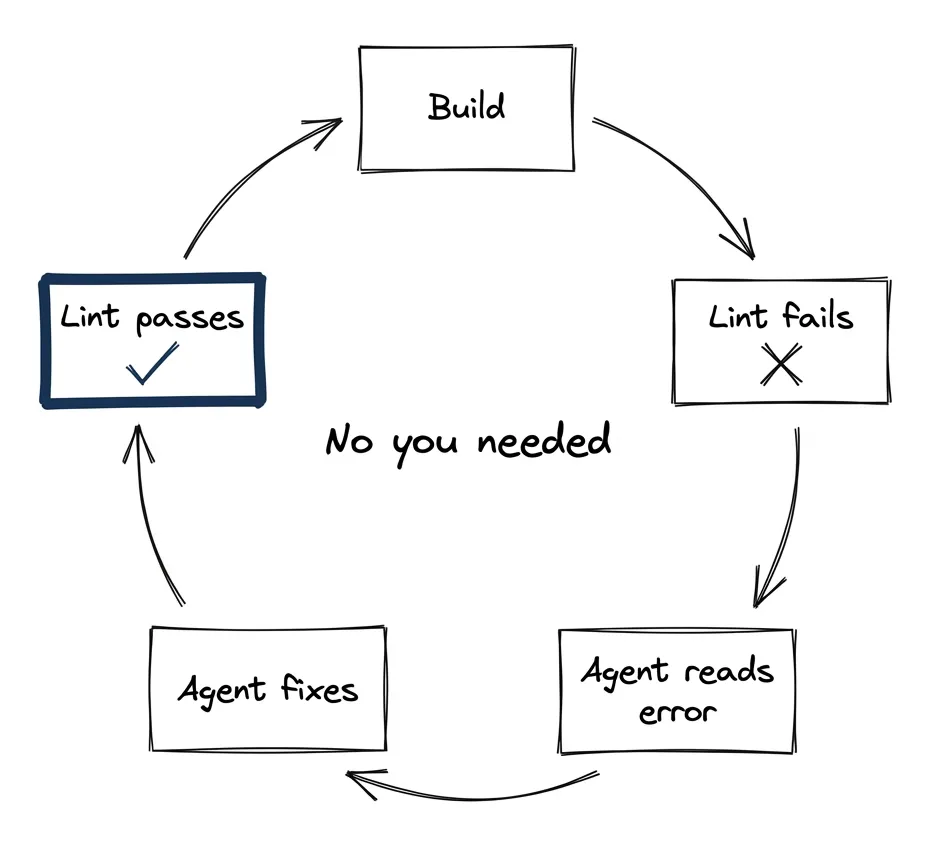
The loop: Build → Lint fails → Agent reads error → Agent fixes → Lint passes → Commit. This runs without you. (Part 4 covers the full verification stack.)
Pillar 4: Persistence
Complex work spans sessions. Context doesn’t.
Plan mode works for well-defined tasks. If execution goes exactly as planned and doesn’t take more than one or two compactions, you’re fine. The plan sits in a separate file — Claude can reread it, you can reference it.
The problem isn’t that plans disappear. The problem is that plans change.
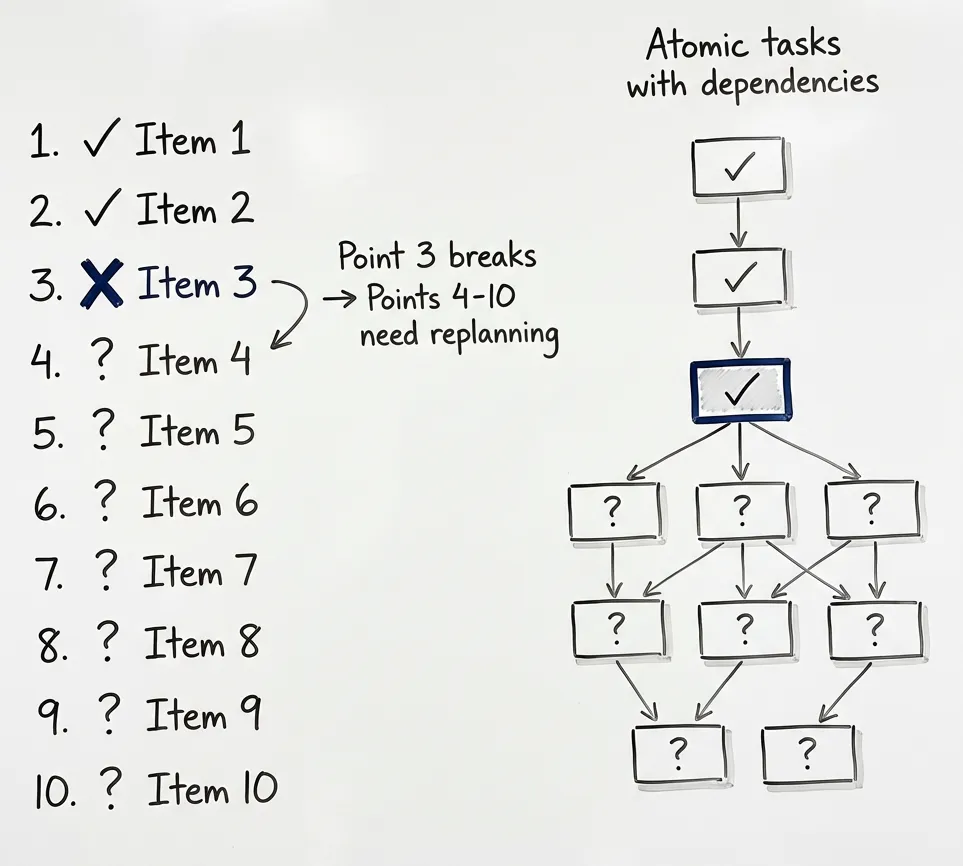
Your 10-point implementation plan hits point 3. Something doesn’t work as expected. Different library needed. Edge case you didn’t anticipate. Now points 4-10 need replanning. While you’re still executing. In the same context. Getting messier.
There’s another problem. During execution, you don’t want to distract your agent. You notice something — a potential bug, a refactor opportunity, something to investigate later. Do you interrupt? Lose momentum? Note it mentally and forget?
Beads solves both.
Beads is a git-backed task tracking system designed for agent work. Steve Yegge — one of the more prominent vibe coders — developed it over several iterations. He wrote about why he built it and how it evolved. Written in Go. Fast.
Instead of one big plan, you get atomic tasks with dependencies. The whole tree persists across sessions, syncs to your repo.
bd ready                              # What's available?
bd update beads-123 --status=in_progress  # Claim it
# ... work ...
bd close beads-123                    # Done
bd sync                               # Persist to git
See an issue while working? File it as a beads task. Agent continues on the current work. The issue is tracked, you’ll get to it. No context pollution, no lost observations.
Tomorrow you start fresh. bd ready shows what’s next. Agent picks up where it left off. State survived the night. (Part 5 is a deep dive on Beads.)
Pillar 5: Scaling
Everything above works great. But as your agent works, context fills up.
Say you need to explore a codebase before implementing something. The exploration alone might consume most of your context window. Now you have knowledge but no room to use it.
Sub-agents let you parallelize without filling up the main context.
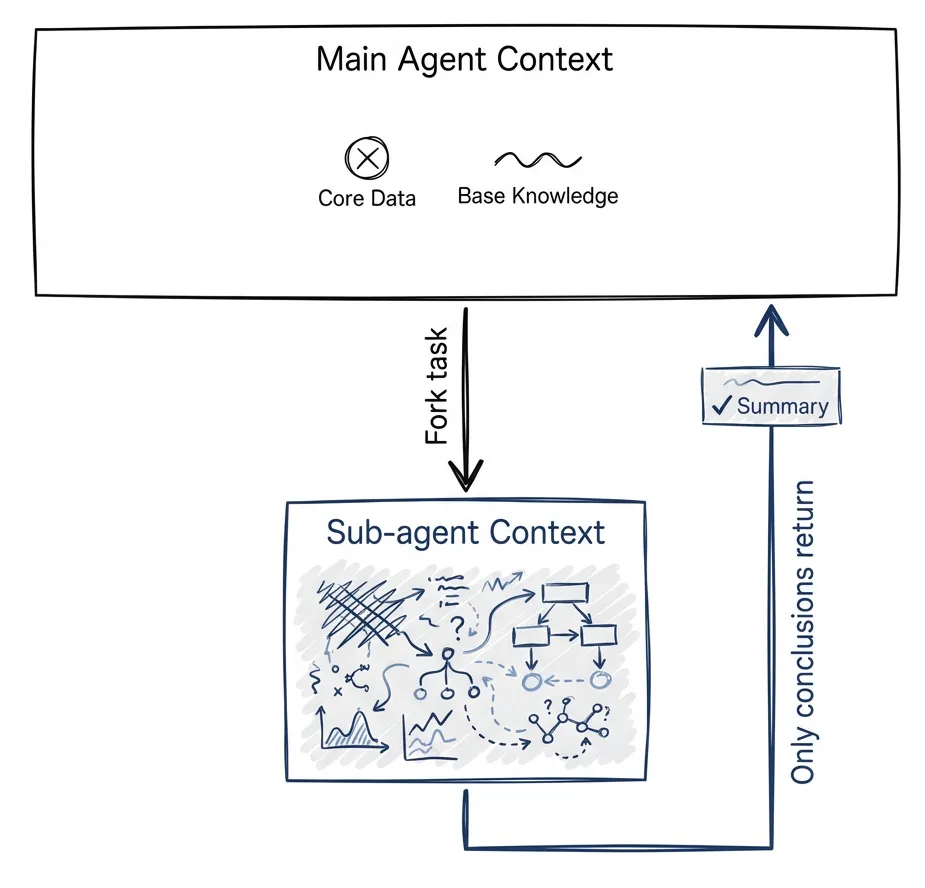
Fork off a task: “Explore how authentication works in this codebase.” Sub-agent does the work in its own context. When done, only conclusions come back. Exploration stays isolated.
This also changes who evaluates. If you have a task to implement and then evaluate the result — offload both to a sub-agent. The main agent evaluates what the sub-agent produced. Agent reviews agent. Not you.
Like function calls for reasoning. Send inputs, get outputs, don’t carry intermediate state. (Part 6 covers sub-agents in depth.)
There are also expert personas. Specialized agents with domain knowledge. AdTech architect who knows programmatic advertising. Security analyst hunting vulnerabilities. You can have Claude generate these personas for you.
But we’re getting ahead of ourselves. Let’s make sure we’re comfortable giving one agent all the tools and environment it needs. Then scale further.
Sub-agents and expert personas are another 30-40%, project-specific customization when the foundation is right. As we develop this series, we’ll go deeper.
Quick Productivity Boost
What pillars 1-4 get you:
- Context: Ref MCP for docs on demand (or Context7, or DeepWiki)
- Skills: Repeatable expertise across agents and commands
- Verification: Playwright + quality gates for self-correction
- Persistence: Beads for tracking work across sessions
Pick one. Any one. You’ll feel the difference immediately.
You’ll feel the impact even without the remaining customization. Domain-specific personas, project-specific commands, CI/CD integration — that stuff comes later.
Getting started: Copy this page. Paste it into Claude. Say “walk me through this setup.” Let your agent follow the instructions. That’s how it works now.
Blueprint repository: github.com/postindustria-tech/agentic-development-demo — A starter project with all the workflows, quality gates, and CLAUDE.md structure described here. Clone it, adapt to your stack, start working.
The Practice
There isn’t really a catch. Running one MCP command is easy. The work is in the experimentation.
The loop: Give an instruction. Trust the agent. Watch what happens.
If you change your CLAUDE.md, restart Claude Code so it rereads the file.
If the agent isn’t following your instructions the way you expect — stop it. Ask it to analyze its own actions. Ask it to suggest improvements to the instruction file. Ask it to make those changes.
You’re guiding it to write better guidance for itself. That’s the loop.
The mental model: You’re managing a junior developer who can read a lot. Teach it, put guardrails, teach again. Ask it why it took that step. Invest in the verification layer.
Every improvement we’ve talked about makes your codebase better even without an agent. Linters, obviously. Documentation lookup. Skills for consistency.
We haven’t covered one important piece: documenting the codebase itself. Not the naive way where your CLAUDE.md grows to unmanageable size — structured, lean, knowing what belongs in instructions versus what the agent should read from code. That’s a later post in this series.
What Not to Forget
Context exhaustion is real. Agents become measurably worse near the end of their context window. This is actually what prompt injection attacks exploit — fill context with legitimate-looking content, then the model becomes more suggestible. I demonstrated this hacking a 43k-star tool in 90 minutes.
The solution: start fresh whenever you can. Use /compact. Restart Claude Code. With persistence and rules already defined in your codebase, you lose nothing by restarting. No hand-curated instructions disappear.
The ideal state: your agent wakes up at any moment and knows how to work with the codebase. When it makes a mistake, the environment tells it. You can restart from anywhere.
Atomic commits. Minimal, cohesive changes. Best practices for software development anyway — not specific to agents.
Not for everything: Quick one-off scripts, unfamiliar domains where you can’t verify output, prototypes where correctness doesn’t matter — copilot mode is fine. Don’t overcomplicate simple tasks.
Pick one pillar. Set it up. The agent can already do more than you’re asking. Give it what it needs to drive.
First post in a series on agentic development. Next: deep dives into MCPs, skill development, verification patterns, and sub-agent architectures.