Your agent writes code that compiles. You run it. Something’s off — the button is invisible, and the function has grown into a 200-line conditional nightmare.
You could review everything manually. Or you could let the agent check its own work.
If a task is verifiable, it’s optimizable. Simon Willison put it well: “The new most predictive feature to look at is verifiability. If a task/job is verifiable, then it is optimizable directly or via reinforcement learning.” Andrej Karpathy’s work on RLVR (Reinforcement Learning from Verifiable Rewards) backs this up at the training level — models that can verify their answers learn to reason better.
The same principle applies to your agent at runtime. Tasks with quick, well-defined verification can run autonomously. Tasks without it need you in the loop.
This post covers the verification layer: quality gates that reject bad code, visual testing so the agent can see what it built, and the feedback loop tying everything together.
Why Verification Matters More for Agents
Think of your agent as a junior developer who can read faster than anyone you’ve ever met. Impressive output volume. But there’s a catch: they don’t know what “bad” looks like in your codebase.
Humans have intuitions that agents lack. We look at the UI and something feels wrong before we can articulate why. We sense when a function has grown too complex. We know our own standards because we developed them.
Agents need these things made explicit:
- Linter configs that define what’s acceptable
- Visual feedback through screenshots
- Automated gates that return pass or fail
Without verification, you’re the quality gate. Every piece of output needs your review. That’s copilot mode again — you driving, agent typing.
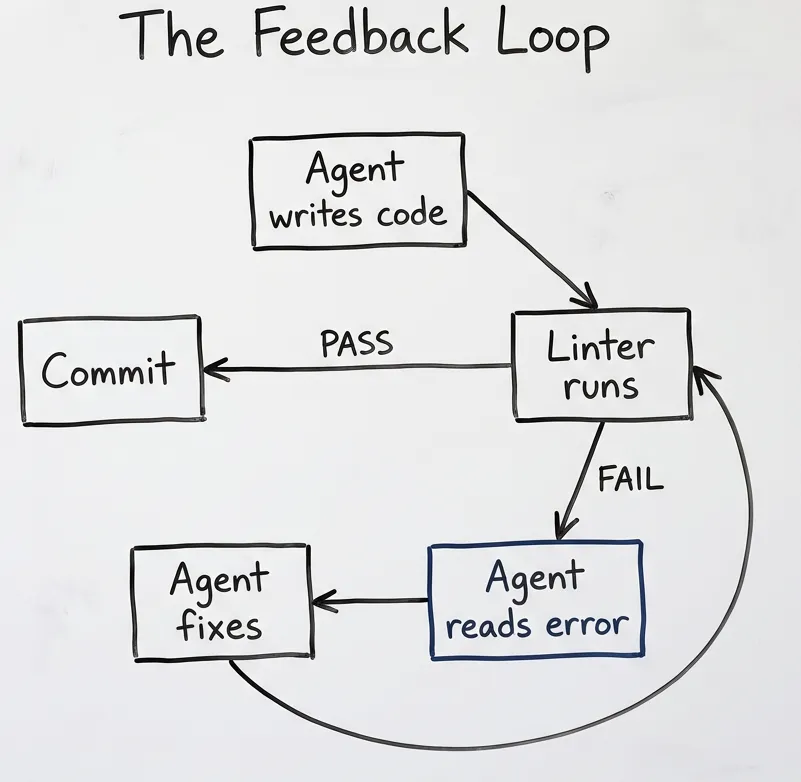
Quality Gates
People complain about agent output. “It doesn’t understand the codebase.” “The code is spaghetti.” “Impossible to maintain.”
Fair. But here’s the question: how do you know the code is bad? What exactly is wrong with it?
If you don’t like the naming conventions — that’s enforceable. If functions are too long — there’s a metric for that. If logic is tangled — cyclomatic complexity has been measuring that for decades. Cohesion between methods, public vs private visibility, parameter counts — people spent years defining what code quality means. They built instrumentation around it. SonarQube. ESLint. Ruff. The definitions exist. The tools exist.
Use what’s already there.
Quality gates are automated checks that run before code gets committed. One command, pass or fail.
npm run quality # Lint + typecheck + testsThese tools won’t give you great code. But they prevent clearly bad code from getting through. And when the agent is producing volume, preventing bad code matters more than ever.
Essential Rules for Agent Output
Function length: Functions over 50 lines get flagged. When this rule exists, the agent naturally breaks things down.
Cyclomatic complexity: Set the threshold to 10. Anything higher gets rejected. This prevents the nested conditional hell that agents love to produce.
Parameter count: More than 4-5 parameters? Use an object. This catches “everything and the kitchen sink” function signatures.
The feedback loop in action:
// ESLint rejects this (complexity too high, too many params)
function processUser(name, email, age, role, status, permissions, settings) {
  if (role === 'admin') {
    if (status === 'active') {
      if (permissions.includes('write')) {
        // 50 more lines of nested conditions...
      }
    }
  }
}
Agent reads the error, rewrites:
interface UserInput {
  name: string;
  email: string;
  age: number;
  role: UserRole;
  status: Status;
  permissions: Permission[];
  settings: Settings;
}

function processUser(input: UserInput): ProcessedUser {
  const validator = new UserValidator(input);
  const processor = new UserProcessor(validator.validate());
  return processor.process();
}
The agent didn’t need your explanation. Linter rejected it, agent read the error, agent fixed it.
Teaching the Agent How to Fix
Linters flag problems. They don’t explain how to solve them. That’s where your CLAUDE.md comes in.
Different violations need different fixes:
Complexity too high? Break the function into smaller pieces. Single Responsibility Principle — each function does one thing.
Too many parameters? Group them into an object.
Deep nesting? Extract conditions into guard clauses. Return early instead of nesting deeper.
God class doing everything? Split by responsibility. SOLID principles exist for this.
SOLID, GRASP, Gang of Four — people figured this out decades ago. Reference them in your CLAUDE.md:
## Code Structure

When linter flags complexity issues:
- Apply Single Responsibility: one function, one job
- Use Parameter Objects for 4+ parameters
- Prefer guard clauses over nested conditions
- Extract helper functions rather than inline everything
The agent knows these patterns from training. Tell it which ones you prefer.
The eslint-disable Problem
One thing to watch: when agents hit ESLint errors they don’t want to fix, they add // eslint-disable-next-line.
This hides issues from your quality gates. The code passes, but the problem’s still there.
Solution: Add to your CLAUDE.md:
## ESLint Rules

NEVER use eslint-disable comments without explicit justification in a comment.
If a rule is triggering incorrectly, fix the code, don't silence the warning.
Periodic audits help too. Ask the agent to review all eslint-disable comments in the codebase and evaluate whether each is legitimate.
Configuring Your Quality Gates
A real configuration from a production project:
{
  "scripts": {
    "quality": "npm run format:check && npm run lint && npm run typecheck && npm run test:unit",
    "quality:full": "npm run quality && npm run test:e2e && npm run build"
  }
}
npm run quality: Fast checks. Run before every commit. Format check, lint, TypeScript, unit tests.
npm run quality:full: Thorough checks. Run before merging. Everything above plus E2E tests and build validation.
Python equivalent: Same pattern with different tools. Ruff for linting/formatting, pytest for tests, mypy for types.
# pyproject.toml scripts via uv or poetry
uv run ruff check . && uv run ruff format --check . && uv run mypy . && uv run pytest
The CLAUDE.md enforcement:
## Quality Gates

Before EVERY commit:
npm run quality
# Expected: All quality gates passed

If fails: Fix ALL errors before committing.
Do NOT use "fix later" or "minor issue" rationalizations.
Visual Testing with Playwright
Code that compiles isn’t code that works visually.
Agent writes a button component. TypeScript is happy. ESLint is happy. You run it — the button is invisible because z-index is wrong. Or the text is white on white. Or it renders off-screen.
Playwright is pre-installed in Claude Code. The agent can take screenshots, click elements, fill forms, verify layouts.
// Agent can run this
await page.goto('/dashboard');
await page.screenshot({ path: 'dashboard.png' });
// Then read the screenshot and verify layout
I use visual testing for UI components, layout changes after CSS modifications, responsive behavior, and error states that only appear under certain conditions.
Skip it for pure logic (unit tests are faster), API endpoints, and performance work — different tools entirely for those.
Visual testing is slower than linting. Use it for UI work where visual verification matters. Don’t use it as a primary gate.
The Verification Stack
Different checks catch different problems at different speeds.
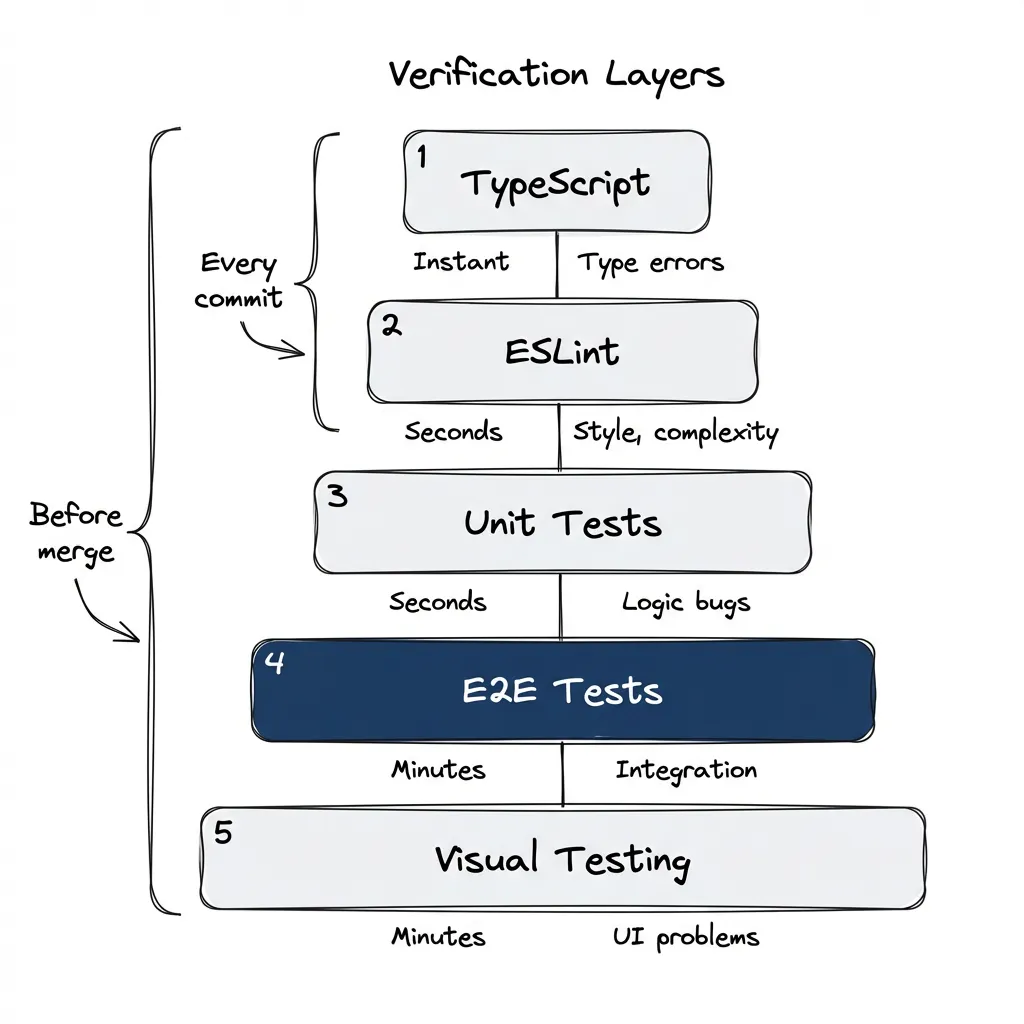
| Layer | Catches | Speed |
|---|---|---|
| TypeScript | Type errors | Instant |
| ESLint | Style, complexity | Seconds |
| Unit tests | Logic bugs | Seconds |
| E2E tests | Integration issues | Minutes |
| Visual testing | UI problems | Minutes |
Fast checks run on every commit. Thorough checks run before merge.
This layering matters because agents work in loops. Faster feedback means more iterations in the same time. If every check takes minutes, the agent can only try a few times before you run out of patience.
When Verification Isn’t Enough
Verification catches implementation bugs. It doesn’t catch requirements bugs.
Consider: your agent can write 100 passing tests for behavior that’s completely wrong. Why? Because the tests verify what the code does, not what it should do.
The Angry Client Problem
Remember early in your career when a client said “but it’s obvious that…” and you had no idea what they meant? They knew the domain. You didn’t. What seemed like an obvious requirement to them was invisible to you.
Now you’re the client. The agent is the junior who doesn’t know your domain.
Intrinsic requirements. Unspoken assumptions. Domain knowledge you’ve accumulated over years. The things that make you effective — precisely because they’re so internalized you forget they need to be stated.
When the agent misses something you thought was obvious, that’s not the agent being stupid. That’s you underspecifying requirements. Same situation, roles reversed.
Requirements Are Also a Solved Problem
Just like code quality, requirements gathering isn’t something you need to reinvent.
User stories. Acceptance criteria. BDD scenarios. Domain-Driven Design. Whatever works for your team. People figured this out decades ago — use their work.
In practice:
- Write acceptance criteria before implementation — and let your agent help. Explain how you prefer them structured, then just talk. Describe what you want. The agent will turn your stream of consciousness into structured criteria.
- Include definition of done in your task tracking (beads, Jira, whatever)
- Make the implicit explicit — if you catch yourself thinking “obviously,” write it down
Judgment calls linters can’t make:
- Is this the right architecture?
- Should this be two services or one?
- Does this feature actually solve the user’s problem?
These still need human review. But most “agent failures” are really requirement failures — you didn’t specify what you wanted clearly enough.
Verification is necessary but not sufficient. You still need to define what “correct” means. But once you’ve defined it, verification ensures the agent stays on track.
Getting Started
This week:
-
Add one complexity rule: Start with
max-lines-per-function: 50in your ESLint config. Watch how the agent’s output changes. -
Set up
npm run quality: Combine format check, lint, typecheck, and unit tests in one command. Run it before every commit. -
Try one visual check: Add a Playwright test that takes a screenshot of one page. Let the agent see what it built.
Next month:
-
Tune the thresholds: Every codebase is different. Find what complexity level works for your project.
-
Add visual regression: Compare screenshots between runs. Catch unintended UI changes.
Blueprint repository: github.com/postindustria-tech/agentic-development-demo — has quality gates pre-configured with the patterns described here.
The Loop
Without verification: Agent writes code. You review it. Find problems. Explain what’s wrong. Agent rewrites. You review again. Repeat until exhausted.
With verification: Agent writes code. Linter rejects it. Agent reads error. Agent fixes. Linter passes. Commit.
You’re not the quality gate anymore — the tooling is. You verify output, not process.
The agent that can check its own work is the agent that can work autonomously. Give it the feedback loop. You’ve got better things to do than read diffs all day.
Fourth in a series on agentic development. Previously: Stop Using Claude Code Like a Copilot, MCP Setup, and Plugins. Next: persistence with beads for work that survives across sessions.