user> "Summarize this customer's account status."

system>
  Processing...

  Account data retrieved. 847 fields across 12 tables.
  Analyzing request context...

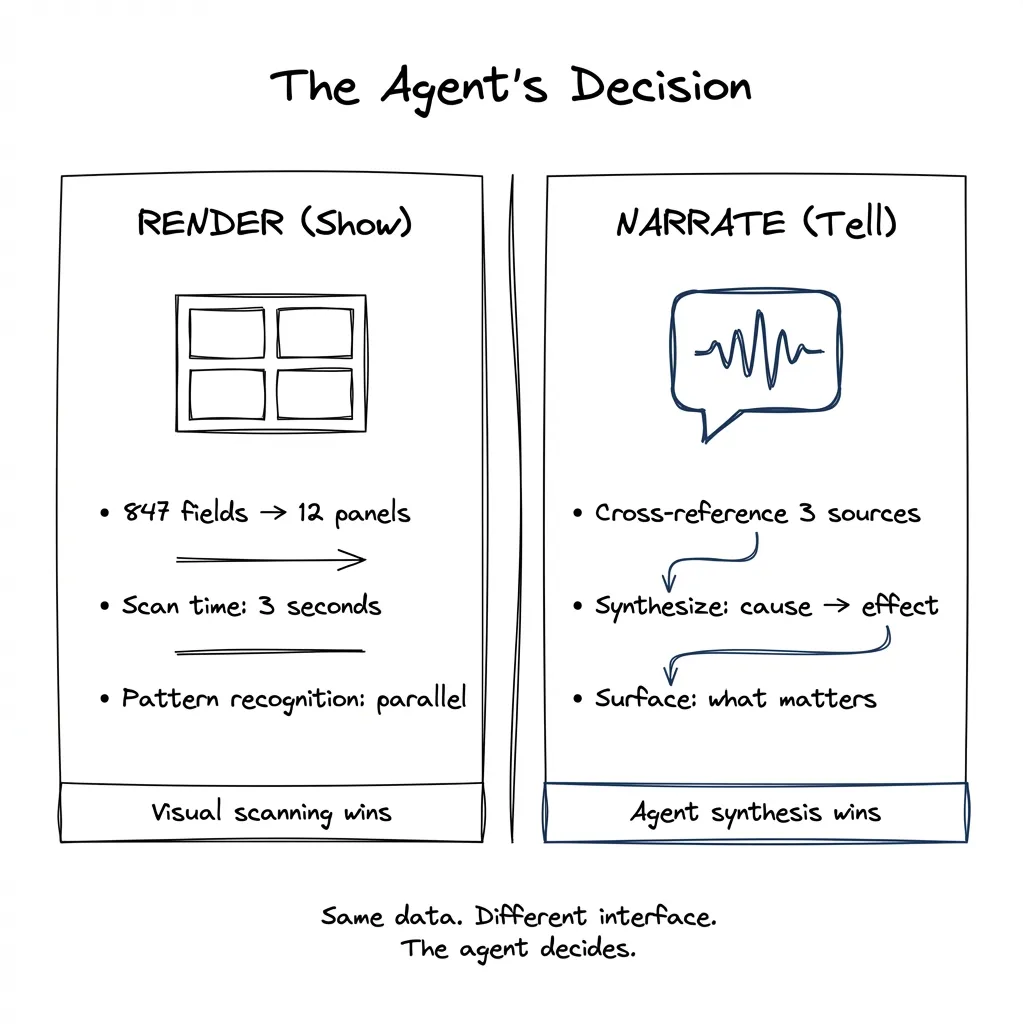
  Decision point: RENDER or NARRATE?

  Option A: Generate visual dashboard.
    - 847 fields compress to 12 panels
    - User scan time: 3.2 seconds
    - Pattern recognition: parallel

  Option B: Narrate summary.
    - Relevant fields: 23
    - Synthesis required: cross-reference payment history with support tickets
    - User value: causal narrative

  Recommendation: HYBRID.
  Display account overview (visual).
  Narrate anomaly synthesis (spoken).

**shows info overlay**

system> "The account looks healthy overall, but I noticed three support tickets about
billing errors in the last month — all resolved, but the pattern suggests a upstream
data sync issue."
The agent decides what to show versus what to say.
Client says “add AI to our product.” You nod. Then you stare at the product and think: where?
This is the question nobody prepared you for. There’s no chapter in the PM playbook. No UX pattern library. The frameworks that exist are scattered across consulting decks and Medium posts, and by the time you’ve synthesized them, the landscape has shifted again.
In Part 1, I argued that software is decoupling into three layers: System of Record, Agentic Layer, and Pixels. That’s the architecture. But architecture doesn’t tell you where to start building. It doesn’t tell you which of your product’s 47 features should get an agent and which should stay as buttons and forms.
This post is my attempt to answer that question. I don’t claim to have best practices — nobody does right now. But I’ve been thinking systematically about it, and here’s what I’ve found useful.
The Problem: “Add Agentic” Isn’t a Spec
When a stakeholder asks for “some agentic experience,” they’re not giving you requirements. They’re giving you a direction. And that direction points to a very large territory.
Do you throw in a chat interface? Copy what Notion or Linear did? Wrap your existing product in a conversational layer and call it a day?
The honest answer: nobody knows for certain. The space is moving too fast. What looks good today might seem naive in six months — and we’re designing for what ships three to six months from now. The best we can do is think systematically about the problem.
I’ve watched senior PMs and designers freeze when asked to identify agentic candidates. Not because they lack skill, but because they lack a framework. They’re trying to intuit something that should be reasoned through.
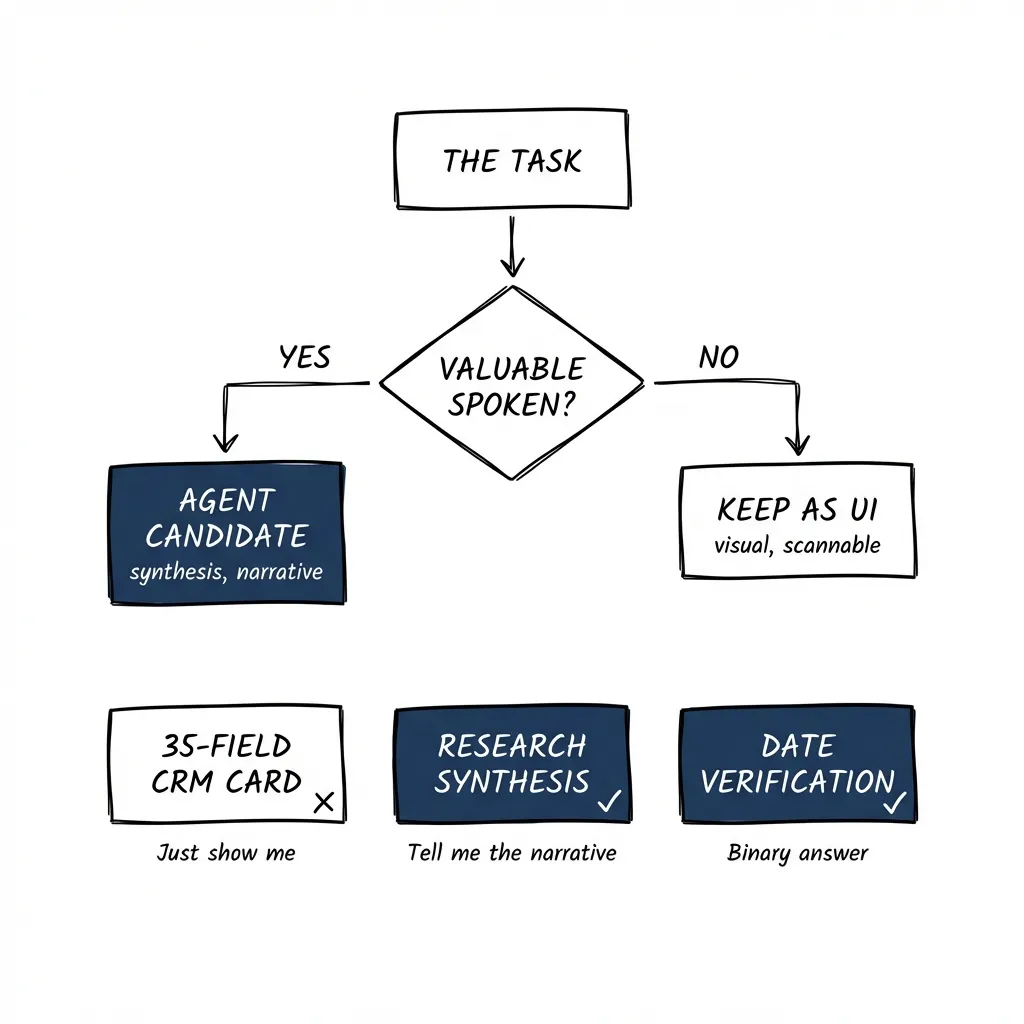
A Litmus Test: Is Its Knowledge Valuable When Spoken?
Here’s the heuristic I use:
Assume there is no UI. You’re just talking to it. Is its knowledge valuable in that form?
If yes — the thing it knows is genuinely useful spoken aloud — you have a candidate for agentic.
If no — if you’d rather just look at it — you probably don’t.
Let me make this concrete.
CRM deal card: Your CRM has 35 fields per deal. You could build an agent that walks you through them conversationally. But would you want that? “The deal is with Acme Corp, the contact is Jane, the deal size is $50,000, the stage is proposal, the close date is March 15th…”
No. You’d rather just look at the card. The value is in the gestalt — seeing it all at once, pattern-matching visually. An agent talking you through 35 fields is slower than scanning them. Not a good candidate.
Document review — checking a date field: An agent verifies that a contract date matches the expected date. The output is binary: correct or flagged. “The date looks good” or “Found a mismatch on page 3.” No visual interface needed. The knowledge is completely valuable spoken. Good candidate.
Research synthesis: “Summarize what we know about this prospect from our CRM, last quarter’s emails, and the three competitor reports we have.” This is better conversational. You want synthesis, not 15 browser tabs. You want the agent to do the cognitive work of connecting disparate sources and giving you the narrative. Good candidate.
The heuristic cuts through the complexity of deciding what to automate. It grounds the decision in user value rather than technical capability.
Proactive vs Reactive: The Missing Dimension
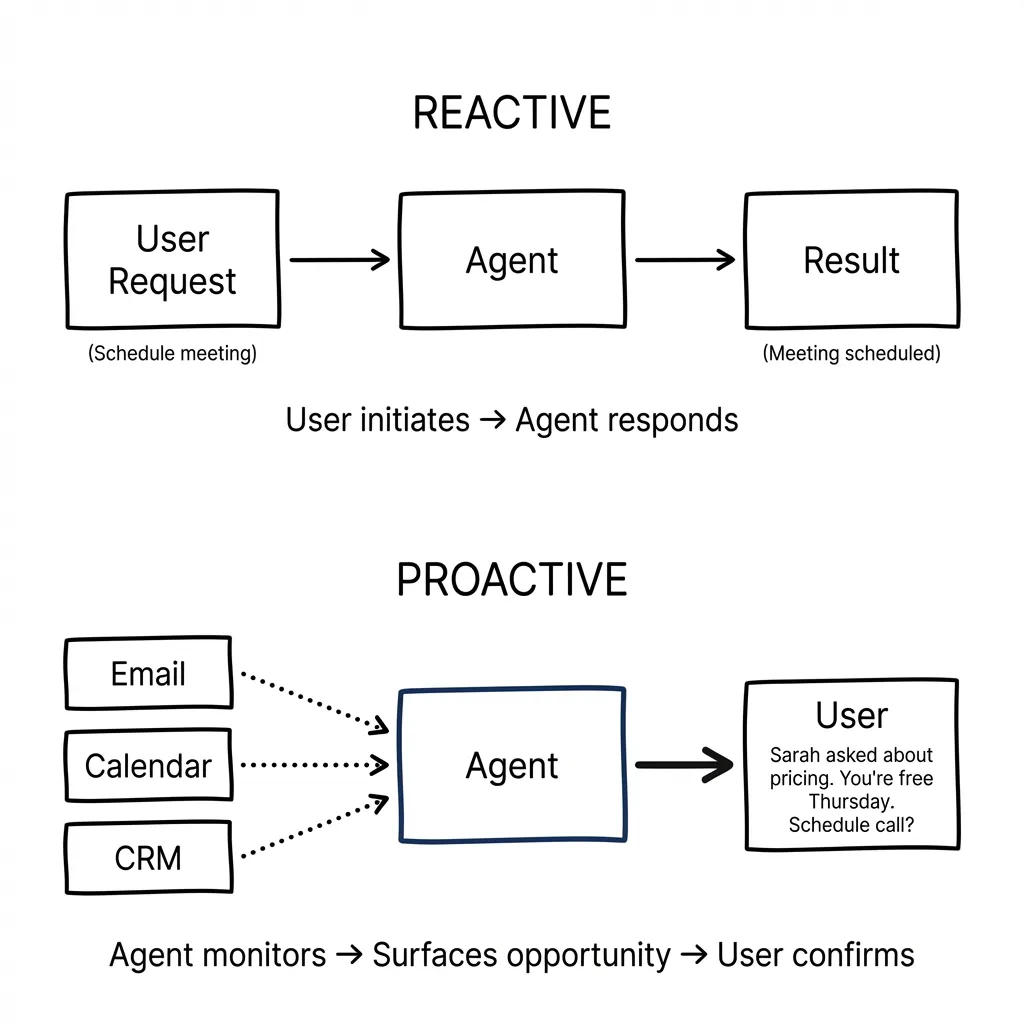
Most of the frameworks I’ve seen focus on reactive use cases — user asks, agent responds. But there’s another dimension that changes everything: proactivity.
Consider what people actually want from AI assistants. Google is testing an experimental tool called CC that delivers daily briefings to users’ inboxes, drafts emails, and suggests next actions by pulling from Gmail, Calendar, and Drive. This points to a shift from reactive tools to proactive decision-makers.
The use cases people gravitate toward — email management, calendar management, agenda organization — all share something: they benefit from an agent that initiates rather than waits.
Reactive example: “Schedule a meeting with Sarah next week.”
Proactive example: Agent notices you haven’t responded to Sarah’s email for three days, sees she asked about pricing, checks your calendar, and surfaces: “Sarah asked about pricing on Tuesday. You’re free Thursday afternoon. Want me to suggest a call?”
The proactive version is more valuable but requires a different design approach. The agent needs context across systems (email, calendar, CRM) and permission to surface opportunities unprompted.
When evaluating a feature for agentic potential, ask: would it be more valuable if the agent initiated? If yes, you’re looking at a strong candidate — but also a more complex implementation.
What Others Are Saying
Several frameworks have emerged, approaching this from different angles. I’ll share the ones with concrete examples — the conceptual frameworks without examples aren’t useful in practice.
Cognitive, Creative, and Logistical Weight (Alex Klein)
In “The Agentic Era of UX,” Alex Klein proposes that agents pull weight across three dimensions: cognitive (analysis and decision-making), creative (visualization and media), and logistical (operational workflow). Score high on two or more, and you’ve got a candidate.
Here’s how that maps in practice:
Intercom Copilot — Cognitive + Logistical weight. When a support agent receives a customer question, Copilot searches conversation history, help docs, internal articles, and synced content from Notion or Confluence. It synthesizes relevant information (cognitive) and suggests replies or next steps (logistical). The agent doesn’t have to hunt through five systems. In testing, agents using Copilot closed 31% more conversations daily.
Adobe GenStudio Content Production Agent — Creative + Logistical weight. Marketers give it a campaign brief. The agent interprets the brief, recommends templates and assets, and generates all versions of campaign creative according to brand guidelines. Minutes instead of days. The agent handles the creative execution (variations, formats, brand compliance) and the logistical orchestration (which channels, which sizes).
Dovetail’s research assistant — Cognitive + Logistical weight. After a user research session, it summarizes transcripts, suggests highlights, and assists with clustering insights. The platform becomes a research teammate rather than a piece of software.
The pattern: when a task spans two or more types of weight, an agent can do the heavy lifting across them simultaneously.
The Deterministic Tool Trap
One argument I’ve seen — including in ServiceNow’s guidance — is that “simple and deterministic tasks should stay in traditional tools.”
I think this is only half the story.
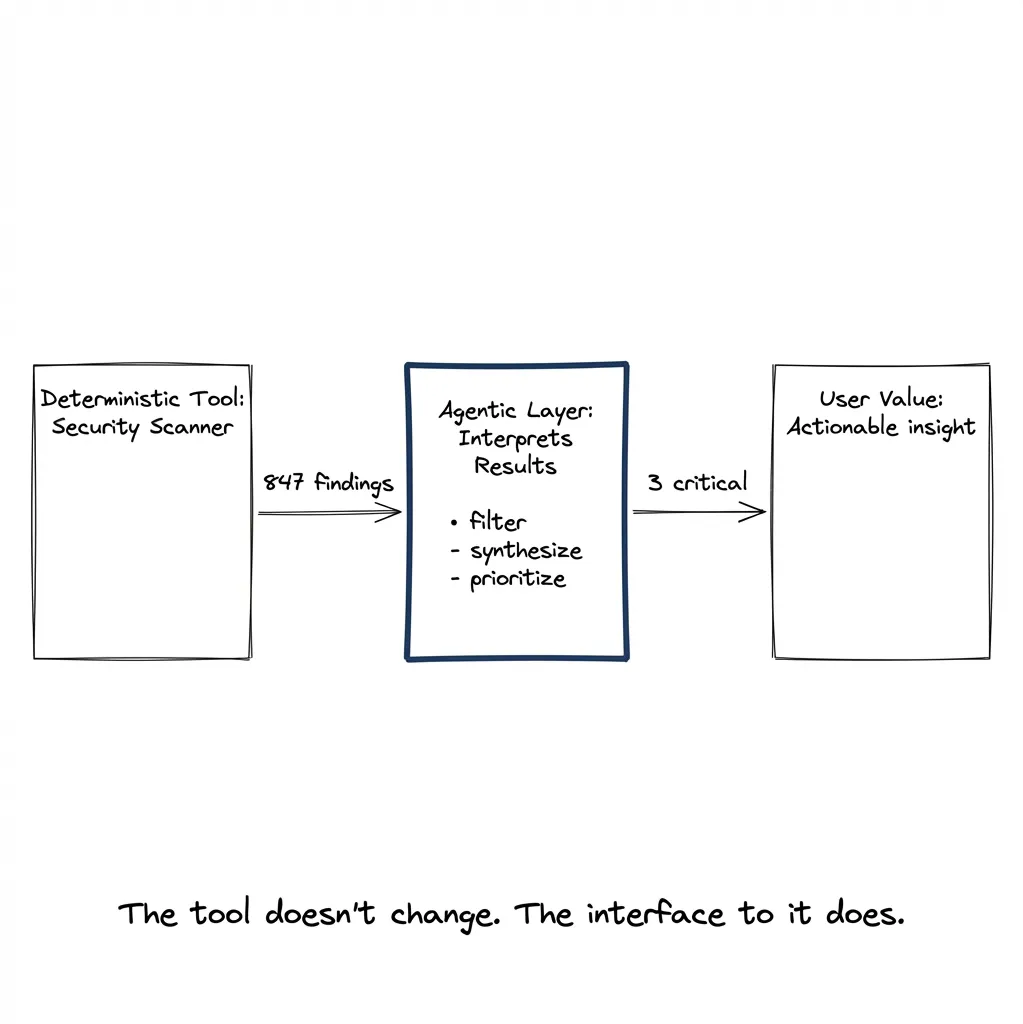
Yes, the tool execution should be deterministic. A security scanner should scan deterministically. A linter should lint deterministically. An API call should return consistent results.
But interpreting the results of that deterministic tool? That can absolutely be agentic.
Security scan returns 847 findings. Most are noise. A few are critical. Reading through them to find what actually matters to your specific situation? That’s synthesis. That’s judgment. That’s a good agentic candidate.
Same goes for code diffs. Same goes for research results. Same goes for any deterministic tool that produces more output than a human wants to process.
The deterministic tool gives deterministic results. The agentic layer consumes those results via MCP, summarizes them, aggregates across sources, and surfaces what matters. The user never needs to know how many transformations happened underneath.
So when evaluating a feature: don’t ask “is the underlying operation deterministic?” Ask “is interpreting the output cognitively demanding?”
Kwame Nyanning and the Term Itself
Worth noting: Kwame Nyanning coined “Agentic UX” after OpenAI announced the GPT Store. He defines it as “the overall experience a person has with an autonomous agent or agent-like product, system, or service.”
The framing matters. We’re not just adding AI features. We’re designing experiences where agents act on behalf of users.
The Gap in User Mental Models
Here’s a challenge nobody has solved yet: users don’t know what to expect from agents.
Their mental model comes from Siri and Alexa. Those assistants respond to explicit commands. “Set a timer.” “Play this song.” “What’s the weather?” Narrow, reactive, deterministic.
Agents work differently:
- They can take multi-step actions
- They can access multiple systems
- They can operate proactively without being asked
- They can fail in unexpected ways
When a user asks Siri to “find flights to Chicago” and gets a web search, they know what happened. When an agent “researches flight options,” accesses their calendar, checks their loyalty programs, and comes back with a recommendation — that’s a black box. Users don’t know what the agent considered, what it missed, or whether to trust the recommendation.
We haven’t figured out how to recalibrate these expectations. The interface design patterns don’t exist yet. Every team is inventing their own approaches to transparency, confirmation, and error handling.
Toward a Placement Scorecard
Given everything above, here’s my attempt at a practical scoring approach. Not definitive — I’d love to hear what others would add.
Dimension 1: Task Complexity
- Simple and deterministic execution → UI wins
- Complex with judgment required → agent candidate
Dimension 2: Knowledge Type
- Structured, visually scannable → UI wins
- Narrative, synthesized across sources → agent candidate
Dimension 3: Autonomy Level Needed
- User wants to drive → UI with suggestions
- User wants to delegate → agent with checkpoints
- User wants to forget about it → background agent with alerts
Dimension 4: Exception Frequency
- Rare exceptions → traditional workflow
- Frequent exceptions requiring judgment → agent candidate
Dimension 5: Proactivity Value
- Better when user initiates → reactive agent or UI
- Better when system initiates → proactive agent candidate
Dimension 6: Cost of Errors
- Low-stakes, reversible → higher autonomy acceptable
- High-stakes, irreversible → human checkpoints required
Applying the Scorecard: Two Examples
Abstract frameworks are useless without concrete application. Let me walk through two real scenarios.
Example 1: Code Review
A dev tools company wants to know if code review should be agentic.
Task Complexity: High. Understanding a PR requires reading the diff, understanding the context, checking for security implications, considering edge cases, and evaluating design decisions.
Knowledge Type: Mix. The diff itself is visual — you want to see the code changes, not have them narrated. But understanding what the changes mean requires synthesis.
Autonomy Level: Reviewer drives. They need to approve or request changes.
Exception Frequency: High. Every PR is different. Security issues, breaking changes, dependency updates — each requires judgment.
Proactivity Value: High. An agent that notices a PR has been open for 3 days with no review and pings relevant reviewers? Valuable. An agent that flags “this touches the auth flow, you might want security team eyes on it”? Valuable.
Cost of Errors: Varies. Missing a typo is low stakes. Missing a security vulnerability is high stakes.
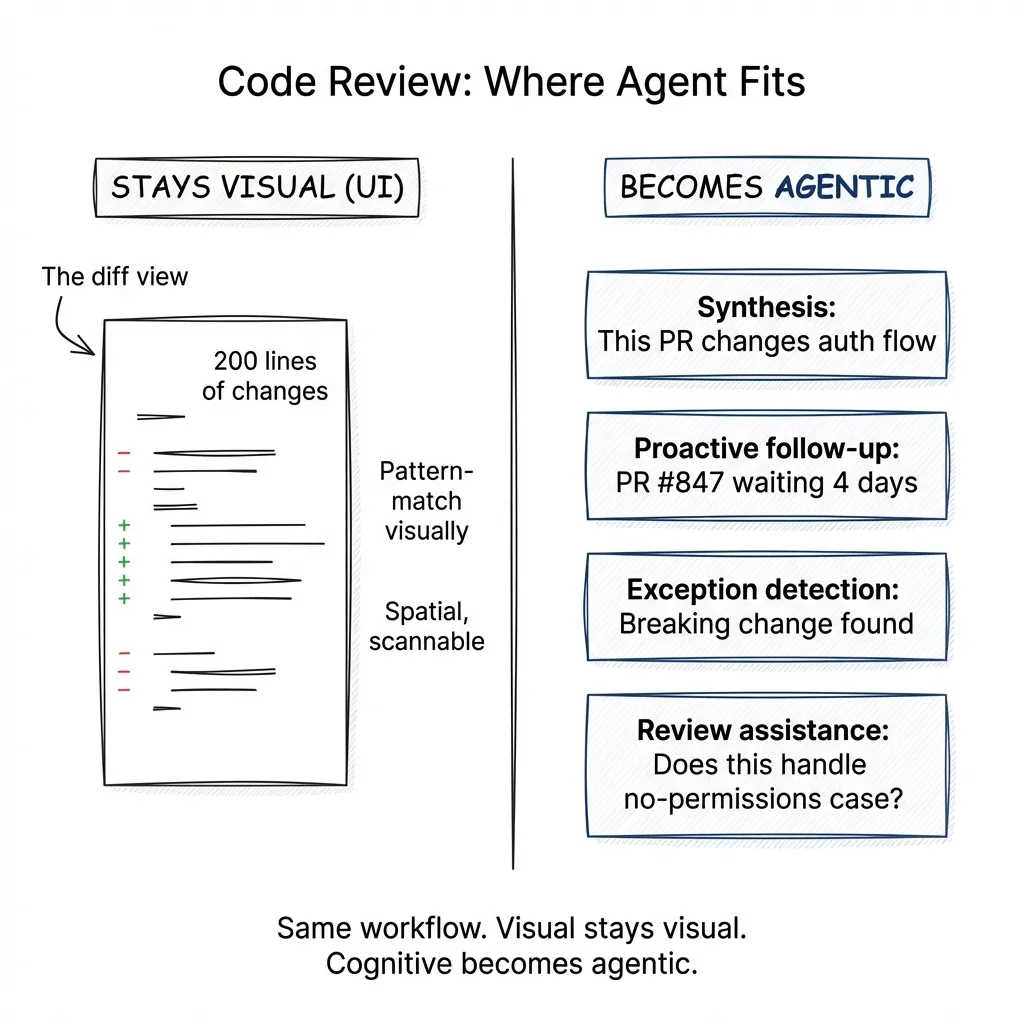
Verdict: The diff view itself is NOT agentic. You want the visual representation — scanning 200 lines of changes is faster than hearing them narrated. Code is spatial. You pattern-match visually.
But several components ARE strong agentic candidates:
Synthesis: “This PR changes how we handle session tokens. Here’s what that means for our auth flow. These 3 files are the ones to focus on.”
Proactive follow-up: “PR #847 has been waiting for review for 4 days. Sarah and Mike have context on this area.”
Exception detection: “This dependency update includes a breaking change in the API. I’ve already checked your codebase — here are the 3 places that call the affected method, and here’s what each one needs.”
Review assistance: When the reviewer types a question in natural language — “does this handle the case where the user has no permissions?” — the agent can search the diff and related code to help answer it.
The lesson: the same workflow has agentic and non-agentic components. The visual diff stays visual. The cognitive work around the diff becomes agentic.
Example 2: Legal Client Intake (Law Firm)
A law firm wants to know if new client intake should be agentic.
Task Complexity: High. Varies dramatically by practice area. An immigration case needs different information than a patent filing.
Knowledge Type: Mix of structured (contact info) and narrative (describe your situation). The narrative part benefits from synthesis — and from structured extraction.
Autonomy Level: User drives initially, but firm needs to assess case viability.
Exception Frequency: High. Every case has unique circumstances.
Proactivity Value: High. An agent that follows up on missing documents, suggests relevant questions based on case type, and flags conflicts of interest adds real value.
Cost of Errors: High. Missing a statute of limitations deadline could be malpractice.
Verdict: Strong agentic candidate — but the interaction model matters.
Consider two approaches:
Form-based: Client fills out 47 fields. Name, address, case type (dropdown), description (text box), relevant dates, opposing parties, etc.
This works. It’s structured. But the client often doesn’t know what’s relevant. They write “landlord dispute” in the description, and the attorney has to schedule a call to understand what actually happened.
Conversational: Client describes their situation in natural language. “My landlord hasn’t fixed the heating for three months. I’ve sent them four emails. They’re now trying to evict me, and I got a notice last week.”
The agent processes this unstructured input and:
- Extracts structured data (landlord-tenant, habitability issue, potential retaliatory eviction)
- Asks clarifying questions (“When did you first notify them about the heating? Do you have those emails?”)
- Detects ambiguity and resolves it (“You mentioned a notice — was this a formal eviction notice or a letter?”)
- Generates a structured profile for attorney review: timeline, parties, key documents needed, potential claims
The output is visual — a clean summary the attorney can scan in 30 seconds. But the input is conversational, and the processing is agentic.
The constraint: high-stakes decisions (case viability, legal advice) still require human review. The agent handles the cognitive work of extraction and synthesis; the attorney handles the judgment.
The lesson: the agentic value here isn’t in replacing the intake process — it’s in adding cognitive capability on top of it. The agent doesn’t recreate the firm’s systems. It uses them, perceives their output, and helps the human make sense of it faster.
The question “where to put the agent” has no universal answer. But it has structure. It has heuristics. It has dimensions you can score.
Start with the litmus test: is its knowledge valuable spoken? Consider proactivity: would it be more valuable if the agent initiated? Apply the scorecard: complexity, knowledge type, autonomy, exceptions, proactivity, error cost. Walk through concrete examples — don’t trust abstract reasoning.
And accept that we’re all building this playbook as we go. What I’ve written here is my current thinking. It’ll probably look naive in six months. That’s the nature of the territory.
In Part 3, we’ll look at what happens after you’ve identified a candidate. How do you design the interface when the agent and the traditional UI need to coexist?