Multiple protocols, different jobs. I keep seeing people confused about which one does what.
MCP gives your agent tools. A2A lets agents coordinate with other agents. A2UI renders interfaces. Commerce protocols handle payments. They’re not layers stacked on top of each other. They’re orthogonal. You might use one, or all of them, depending on what you’re building. They complement each other.
Here’s who’s actually using each in production and when you need which.
MCP: Tool Connectivity
Model Context Protocol connects agents to tools and data sources. This one you’ve probably seen. It’s been around longest and has the most production mileage.
What It Actually Does
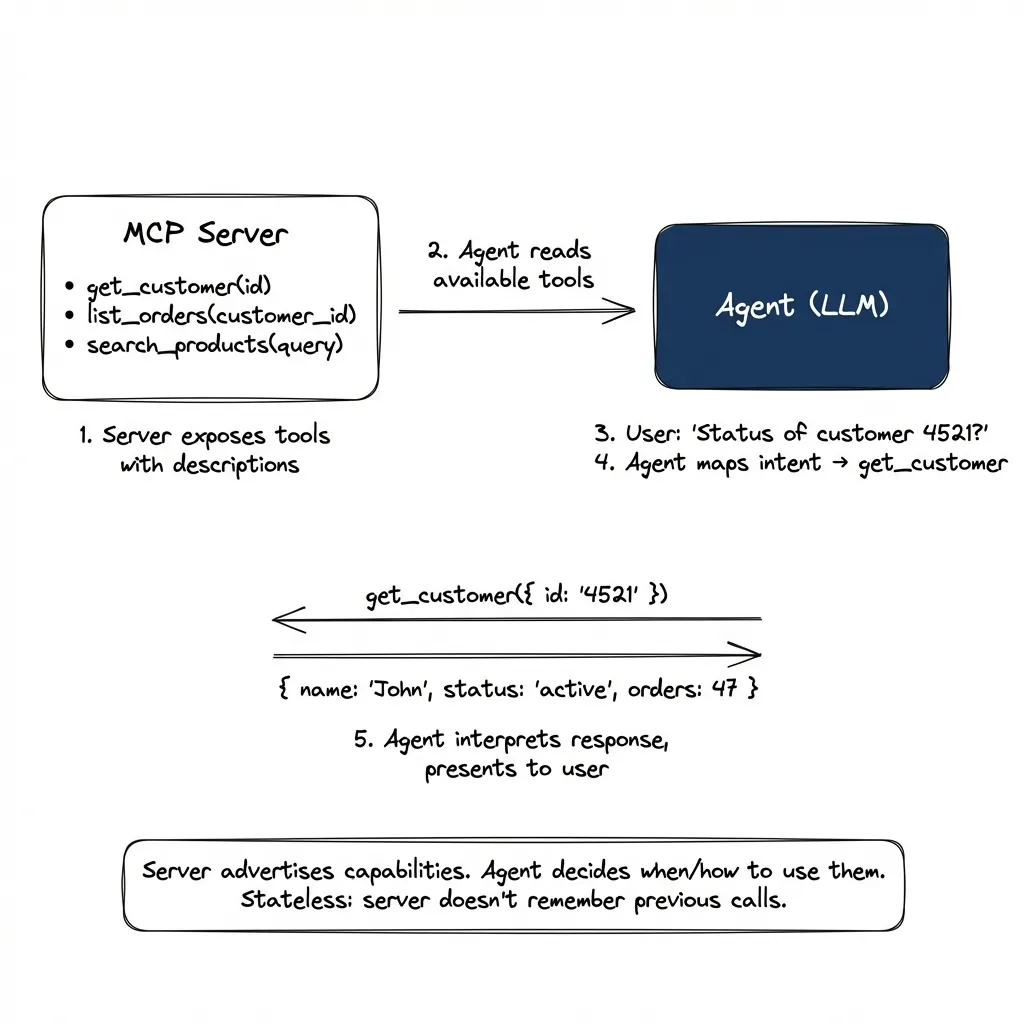
MCP is the closest thing to the core concept of modern agents: an LLM that decides which tools to call. Here’s the actual flow:
- Server registers and exposes tools with descriptions
- Agent reads tool descriptions at connection time
- User expresses intent: “What’s the status of customer 4521?”
- Agent maps intent to tool: looks at available tools, picks
get_customer - Tool call executes: translates to API call, returns JSON
- Agent interprets response: presents it to user in context
# Server exposes tools at registration:
tools: [
  { name: "get_customer", description: "Retrieve customer by ID", params: { id: string } },
  { name: "list_orders", description: "List orders for customer", params: { customer_id: string } }
]

# Agent selects tool based on user intent, calls it:
get_customer({ id: "4521" })
→ { name: "John Smith", status: "active", orders: 47 }

# Agent interprets and presents the response
The server advertises capabilities. The agent decides when and how to use them. It’s stateless. The server doesn’t remember previous calls.
Who’s Running It in Production
Block (formerly Square) runs 60+ MCP servers internally. Their engineers use Goose (an open-source agent) connected to Snowflake, Jira, Slack, Google Drive, and internal APIs. They report significant time savings on routine tasks: looking up data, checking status, pulling reports. Thousands of employees use it daily.
Bloomberg adopted MCP org-wide after building a similar internal protocol. Their engineering blog describes dramatically faster tool integrations. What used to require custom connectors now composes from existing MCP servers.
Razorpay built Blade MCP for their design system. Result: 70% of frontend engineers use Blade to generate components from design specs without writing the initial code. 75% accuracy on first generation, good enough that engineers start from generated code rather than blank files. Non-developers (PMs, designers) are the power users. They describe what they want, Blade generates it.
MCP Is Everywhere
MCP has become the default for tool connectivity. Pretty much every major tool has one now:
- Developer tools: GitHub, GitLab, Sentry, Linear
- Data access: Snowflake, databases, analytics platforms
- CRM/Marketing: HubSpot, Ahrefs, Salesforce
- Project management: ClickUp, Notion, Jira
- Documentation: ref.tools, deepwiki (open and free, no registration)
- Coding assistants: Claude Code, Cursor, Windsurf (all use MCP for tool connectivity)
Companies also build internal MCPs for proprietary data: analysts asking “what were signups last week?” without SQL, engineers navigating codebases, designers generating components from Figma specs.
The pattern: if something exposes an API, someone’s wrapping it in MCP. It’s becoming the universal adapter.
A2A: Agent-to-Agent Coordination
Agent-to-Agent protocol is for when your agent needs to talk to someone else’s agent. Different problem from MCP. And honestly, more interesting.
The Key Difference
MCP is synchronous. Call a tool, get a response, done.
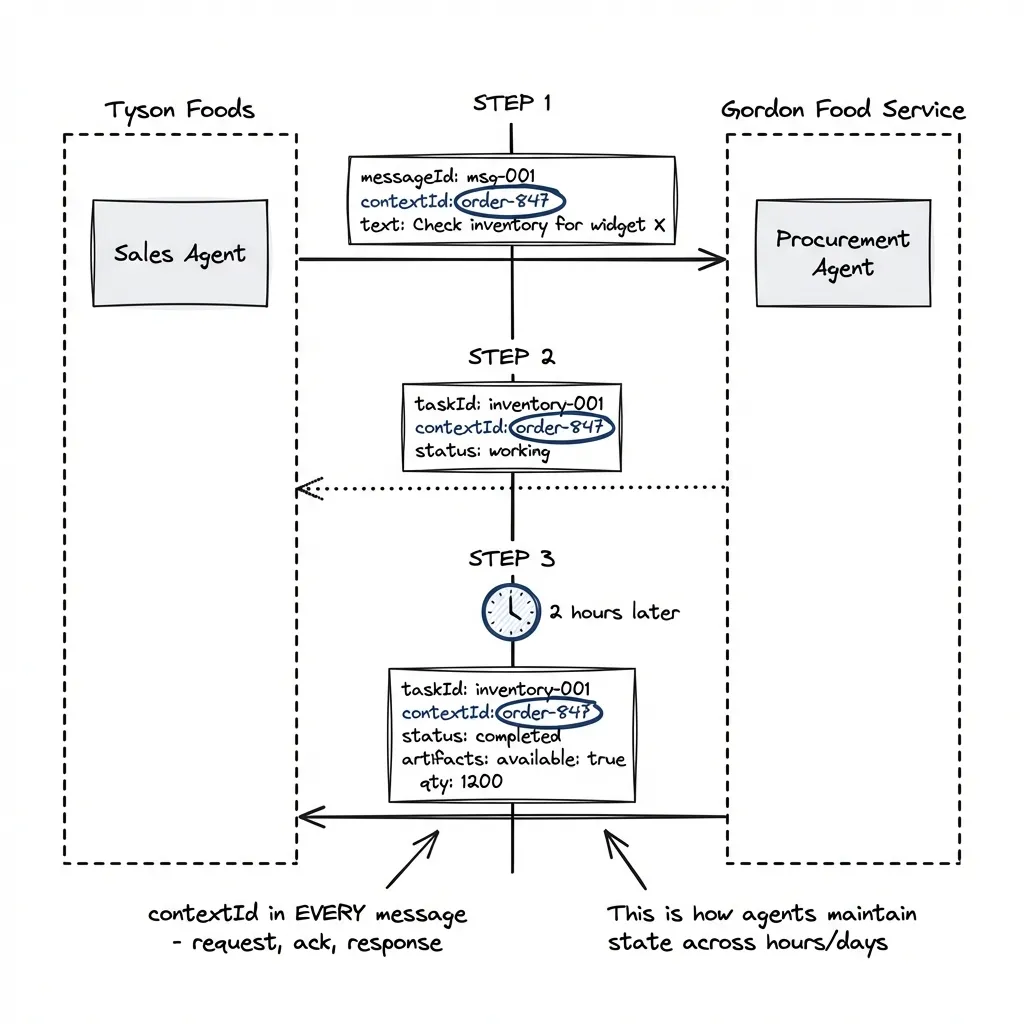
A2A is asynchronous with state. Your agent starts a task with another agent. That task might take hours or days. The other agent pings back with updates.
# Request (your agent starts a task)
{
  "method": "message/send",
  "params": {
    "message": {
      "messageId": "msg-001",
      "contextId": "order-847",        # Links all messages in this conversation
      "role": "user",
      "parts": [{ "text": "Check inventory for widget X" }]
    }
  }
}

# Acknowledgment (supplier agent accepts)
{
  "result": {
    "taskId": "inventory-001",
    "contextId": "order-847",          # Same contextId echoed back
    "status": { "state": "working" }
  }
}

# [2 hours later] Completion (supplier agent finishes)
{
  "result": {
    "taskId": "inventory-001",
    "contextId": "order-847",          # Still the same contextId
    "status": { "state": "completed" },
    "artifacts": [{
      "parts": [{ "text": "available: true, qty: 1200, lead: 3 days" }]
    }]
  }
}
The contextId appears in every message: request, acknowledgment, and response. It’s how agents maintain conversational state across hours or days. The taskId tracks the specific work item within that conversation (you might have multiple tasks in one context). This is what MCP can’t do: MCP is stateless, A2A maintains context.
Who’s Running It in Production
Tyson Foods and Gordon Food Service are pioneering A2A for supply chain coordination. Scenario: Tyson’s sales agent shares product data and inventory updates with Gordon’s procurement agent. Real-time, across company boundaries, without predefined API integrations.
Why not just use REST APIs? I asked the same thing. Because scaling to 100+ suppliers means 100+ custom integrations. With A2A, suppliers register their agent capabilities once. Tyson’s agent discovers and communicates dynamically. No more “can you send us your API docs?”
Microsoft is integrating A2A into Azure AI Foundry and Copilot Studio. 50+ technology partners at launch: SAP, Salesforce, ServiceNow, Intuit, PayPal, Deloitte, McKinsey.
When You Need A2A Instead of MCP
| Scenario | Use |
|---|---|
| Query your own database | MCP |
| Query a partner’s inventory | A2A |
| Call a tool, get immediate response | MCP |
| Start a task that takes hours | A2A |
| Single agent, many tools | MCP |
| Multiple agents, different organizations | A2A |
Security note: A2A includes enterprise auth by default: mutual TLS, OAuth parity with Azure Entra. Tyson’s agent verifies it’s actually talking to Gordon’s agent, not an impersonator. This is table stakes for cross-org communication.
Message broker patterns: A2A itself is just HTTP/JSON-RPC, but enterprise deployments layer message brokers on top. Why? Pure point-to-point A2A has an N-squared complexity problem: 50 agents = 1,200+ bidirectional connections. Publish-subscribe solves this. Kafka is the most commonly cited, but Pulsar is gaining ground for cloud-native deployments. The pattern: agents publish and subscribe to topics, broker handles delivery. Full audit trails. Replay capability.
A2UI: Agent-Rendered Interfaces
Agent-to-User Interface is about agents rendering native UI instead of text walls. This one matters more than people realize.
The Problem It Solves
Your agent has 15 restaurant options. Old way: paragraph after paragraph of text. By the time you read option 8, you’ve forgotten option 3.
New way: Agent generates a card grid. Each restaurant as a card with name, rating, price range, distance. You scan in 2 seconds.
Better yet: Agent generates a date picker and time selector instead of asking “when do you want to go?”
How It Works
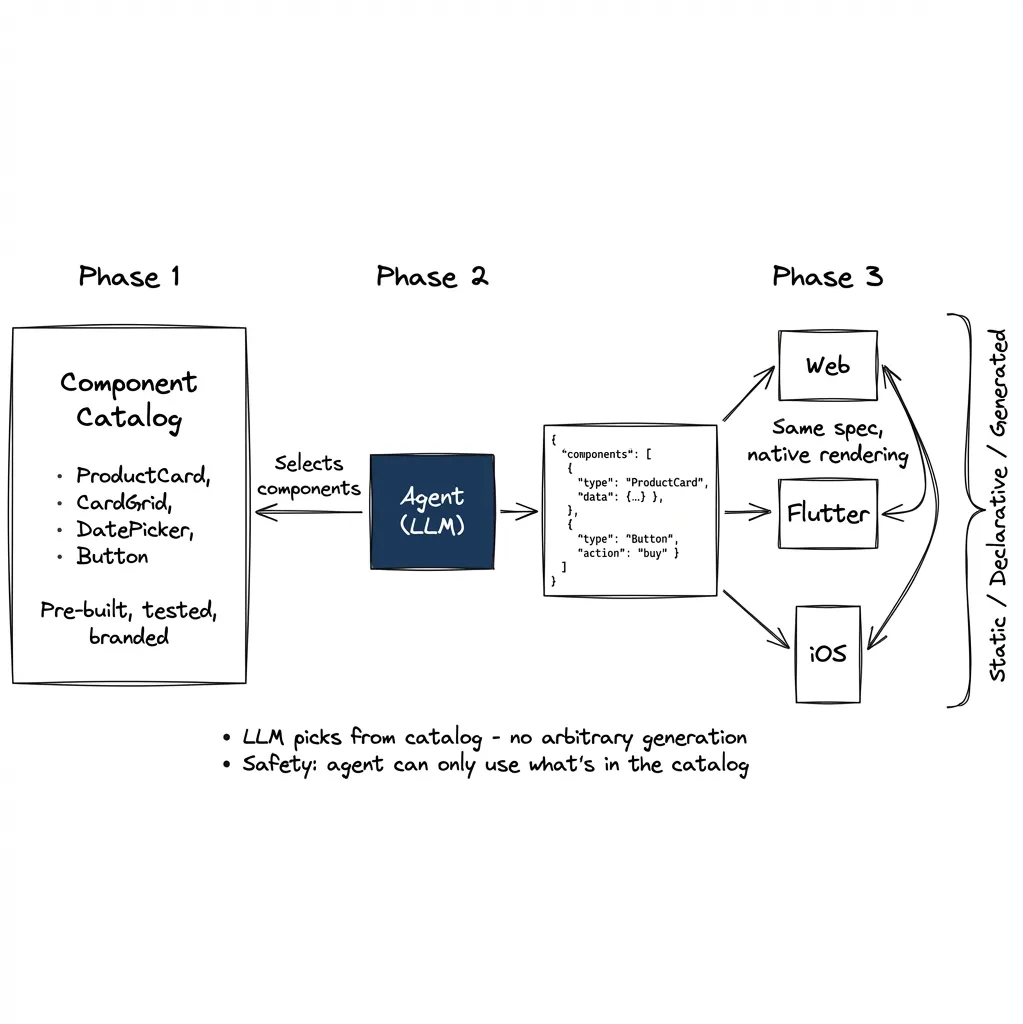
The agent outputs JSON describing components. The client renders them natively.
{
  "components": [
    { "id": "header", "component": "Text", "text": "Available Restaurants" },
    { "id": "grid", "component": "CardGrid", "items": "{{restaurants}}" },
    { "id": "picker", "component": "DateTimePicker", "label": "When?" }
  ]
}
The client has a catalog of approved widgets: Card, Button, DatePicker, List. The agent can only use what’s in the catalog. Same JSON renders as React components on web, Flutter widgets on mobile, SwiftUI on iOS.
Who’s Running It in Production
Google Opal (per Google’s developer blog) has scaled to hundreds of thousands of users building AI mini-apps. Example flow: User uploads a landscape photo. Gemini analyzes it. Agent generates a custom form specific to what it detected: questions about fence style, plant preferences, drainage concerns. Form renders dynamically based on the image content.
Shopify built MCP-UI for e-commerce. Their insight: complex commerce scenarios (dependent product variants, bundle pricing, inventory) need more than text. The implementation uses intent-based messaging: when you click “Add to Cart,” the button doesn’t call an API directly. Instead, it sends an intent like { intent: "add_to_cart", productId: "123" } back to the agent. The agent interprets the intent and decides what to do next.
But here’s the nuance: the LLM isn’t making decisions on every click. That would be expensive and unnecessary. Instead, the LLM selects from pre-built components, backend renders them from templates, and components run in sandboxed iframes. The LLM’s job is tool selection, not runtime logic.
My take: Intent-based UI is interesting, but routing every user interaction through LLM inference is wasteful for deterministic flows like checkout. What makes more sense: use the LLM to model the interaction patterns (analyze sessions, understand what the correct responses should be) then save that as deterministic rules (JSON config, rule files). The LLM designs the behavior; the system executes it deterministically. This is the pattern from the first post in this series: AI writing software for itself. The LLM doesn’t need to think about every checkout. It designs how checkouts should work, and the system handles them without inference costs.
The voice UI example from the previous post works similarly: the agent outputs a deterministic path (which components to activate, which fields to fill), and the UI handles execution. The LLM is there because user intent expression is unpredictable. “Open that deal card” can be said a hundred ways. But once intent is understood, execution should be deterministic.
Microsoft 365 Copilot uses inline editing, generating editable UI elements within documents rather than chat responses.
The Three Patterns
Production deployments use one of three approaches:
Static Generative UI (most common, safest): You pre-build all the components. Agent just picks which one to show and fills in the data. Think: “show the ProductCard component with this product.” The component is already designed, tested, rendered. Agent only controls selection and data binding.
Declarative Generative UI (growing): Agent outputs a JSON spec describing the layout. Frontend interprets the spec and renders. This is A2UI. More flexible (agent can compose components in new arrangements) but still constrained to your catalog. The agent can say “stack these three cards horizontally” without you pre-building that exact layout.
Fully Generated UI (risky): Agent outputs raw HTML/CSS. Used only at build-time, never runtime. Too many ways for agents to break layouts or create security holes.
The key safety mechanism in both static and declarative: the component catalog. Agent can only use what’s in the catalog. No arbitrary code execution. This is why I led with it in the “How It Works” section.
Most production systems use static or declarative. Fully generated is for experimental use only.
The declarative approach makes sense for most applications. Standard library components + theming gives you a wide variety of utilitarian interfaces at almost zero production cost. We focus on application logic, not rendering bugs. That’s the ideal.
The reality is more complicated: the same widget renders differently on web versus Flutter, both in UX and technical implementation. A generic A2UI implementation that works across platforms is genuinely hard. But the idea is good enough that the complexity is worth it. The direction is right even if the execution is still maturing.
Commerce Protocols: ACP and UCP
Two competing standards for agents that buy things. This is where it gets political. Different ecosystems, same goal, competing for merchant lock-in.
ACP: The OpenAI/Stripe Protocol
Agentic Commerce Protocol powers “Instant Checkout” in ChatGPT. Launched September 2025.
Who’s live:
- Etsy: All US sellers (auto-enrolled)
- Coming soon: 1M+ Shopify merchants (Glossier, SKIMS, Spanx, Vuori, Coach)
- 2026: PayPal integration bringing tens of millions of merchants
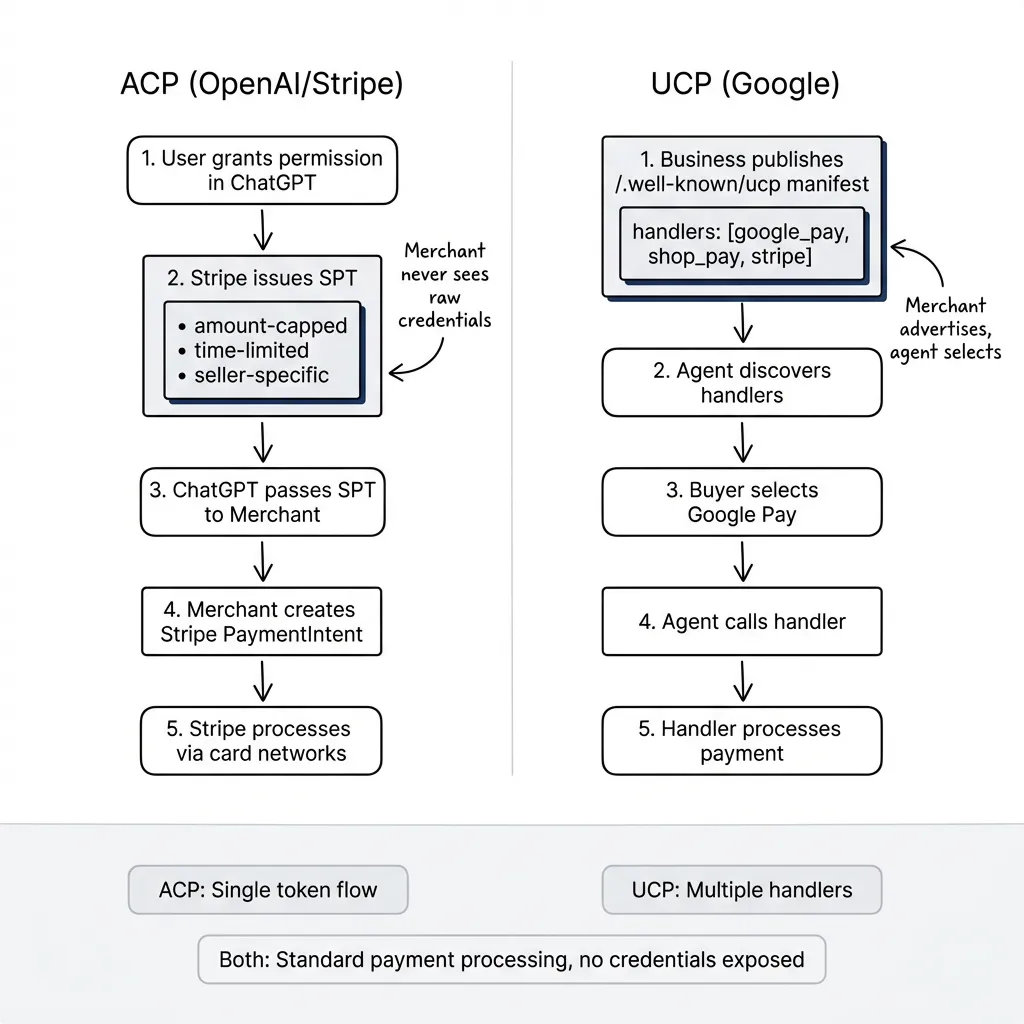
How it works: Shared Payment Token (SPT) model. User grants permission in ChatGPT, Stripe issues a scoped token (amount-capped, time-limited, seller-specific). Merchant processes via Stripe PaymentIntent. The token never exposes raw credentials. Merchant sees only the SPT.
Integration reality: “One line of code” applies only to the PaymentIntent parameter change for existing Stripe merchants. Full ACP integration requires: 4 checkout endpoints, webhook handling, product feed to OpenAI, security setup, and compliance certification. Realistic timeline: 1-6 weeks depending on existing infrastructure.
UCP: The Google Protocol
Universal Commerce Protocol launched January 2026. Powers checkout in Google AI Mode and Gemini.
Who’s live:
- Wayfair, Chewy, Quince: Full checkout in Gemini
- Lowe’s, Michael’s, Poshmark, Reebok: Business Agent features
- Coming: Walmart, Target, Best Buy, Home Depot, Macy’s
Endorsers: 20+ companies including Adyen, American Express, Mastercard, Visa.
How it works: Merchant publishes a manifest at /.well-known/ucp advertising supported payment handlers (Google Pay, Shop Pay, Stripe, etc.). Agent discovers available handlers and selects based on buyer preference. Each handler manages its own token flow.
Integration reality: The “60 days” includes Merchant Center setup (30 days) + technical integration (30 days) + Google’s waitlist and review. You implement 3 REST endpoints, integrate payment handlers, pass conformance checks. More flexible than ACP (multiple payment options), but genuinely more complex.
The honest truth: Neither protocol is disclosing transaction data. No public metrics on volume, conversion rates, or average order values. Market signals are positive (PayPal commitment, 20+ endorsers) but we don’t have hard numbers yet. I find this suspicious. If the numbers were good, they’d be everywhere.
When to Use Which
| Your Ecosystem | Use |
|---|---|
| ChatGPT users, Stripe payments | ACP |
| Google/Gemini users | UCP |
| Both | Support both (Shopify does) |
| Neither yet | Wait and see |
Putting It Together
Most production systems use multiple protocols. An e-commerce agent might use MCP to query inventory, A2UI to render product cards, A2A to coordinate with the shipping partner’s agent, and ACP/UCP to process payment. They’re composable. Pick what you need for each part of the flow.
If you’re starting now: Start with MCP for data access. It’s the most mature. Watch A2A for cross-org scenarios (still v0.3, but Microsoft and 50+ partners are betting on it). Use A2UI when text walls fail. Don’t rush commerce protocols unless you’re already in that ecosystem.
When things fail: MCP failures are simple. Tool calls error, agent retries or asks user. A2A is harder. If a task stalls mid-execution, you need the contextId to resume and audit trails to debug. Commerce protocols have the highest stakes. Failed transactions require refund flows, and both ACP and UCP have dispute resolution built into their specs. Plan for failure modes before going to production.
The protocols are still evolving. MCP just moved to Linux Foundation. A2A is pre-1.0. Commerce protocols are in land-grab mode. Build for what works today, stay flexible for what’s coming. A year from now, the protocol picture will look different. That’s fine. The problems being solved won’t change, just the implementations.
Part 4 of “The Agentic User Experience” series. Previous: The Hybrid UI. Next: Multi-Agent Orchestration.