Someone told you to “just add a chatbot.” You knew it was wrong. This is why.
Why Pure Chat Fails
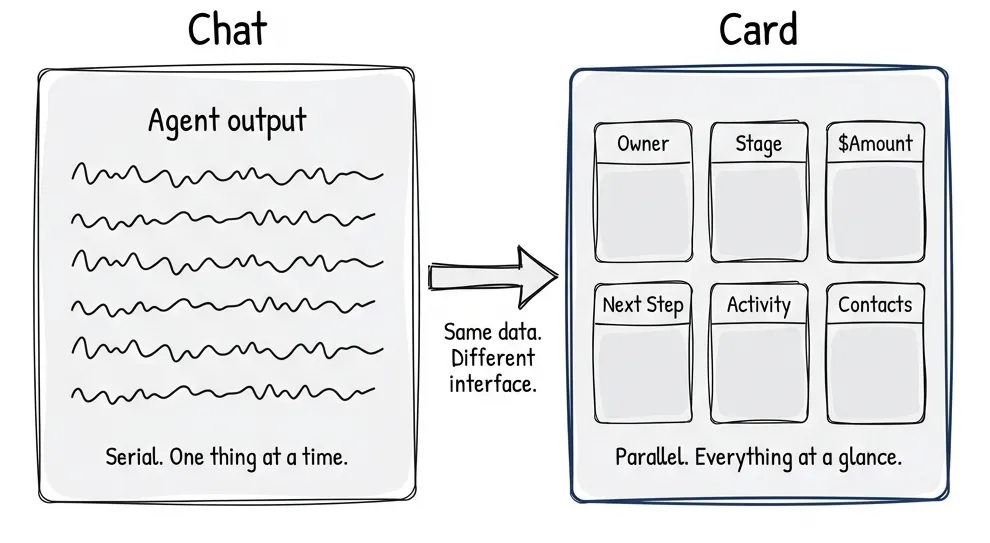
You’re reviewing a CRM deal. Thirty-five fields. Owner, stage, amount, next steps, activity history, related contacts, documents attached. You ask the agent: “Tell me about this deal.”
It starts talking. And talking. Paragraph after paragraph. By the time it gets to the activity history, you’ve forgotten what it said about the amount. You scroll back. You lose context. You’re now reading instead of deciding.
Don’t talk me through 35 fields. Just show me the card.
The model works fine. The interface doesn’t. Chat is serial, one thing at a time, in sequence. Human perception is parallel. We scan. We compare. We see relationships at a glance. A card shows me everything. A paragraph hides it.
Studies back this up. Given a choice between a well-designed GUI and chat, most users pick the GUI. Conversation takes effort. You have to think about what you want, translate it to language, articulate it clearly. That’s work. Sometimes worth it. Often not.
What I’m seeing: chat fading into the background. When agents can call tools, spawn other agents, run asynchronously, the messaging UI starts feeling… dated? It’s getting complemented with task-oriented UIs. Cards, sliders, semantic spreadsheets. The agent provides options. The user picks visually.
Some predictions I’ve seen: chat settles to less than 20% of the interface. I don’t know if that’s right, but directionally it feels true.
The Spectrum: Coherent Shells + Disposable Pixels
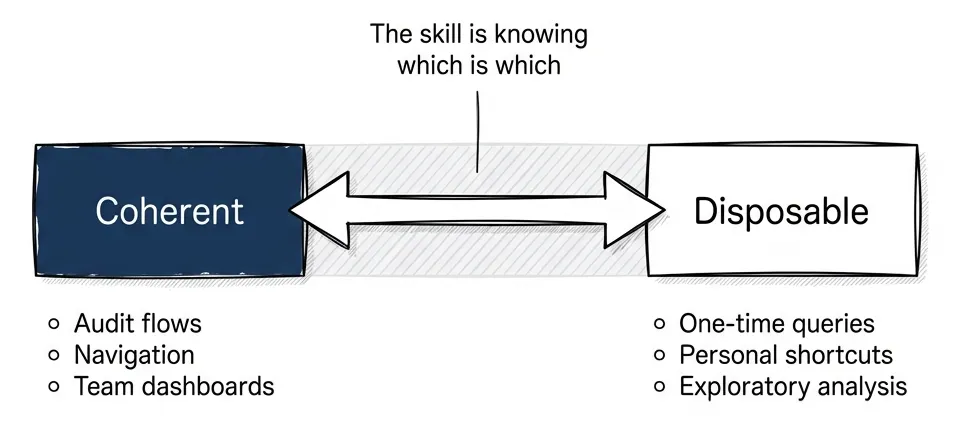
The mistake is thinking this is binary. Chat or GUI. Agent or interface. Pick one.
It’s a spectrum. Some things need to stay stable. Some things can generate on demand.
The framing comes from Nate: coherent shells with disposable pixels inside. Software has been “coherent interfaces” for forty years. Every screen hand-designed, every interaction mapped out. That was economics, not physics. When interfaces become cheap to generate, what still needs to be coherent?
Coherent shells:
- Regulated flows. Compliance, audit trails, approvals. “Show me what the user saw when they approved the loan.” You need reproducible interfaces.
- Shared operational views. Team dashboards, collaborative surfaces. “Look at this dashboard” only works if everyone sees the same thing.
- High-habit flows. The homepage. The navigation. What users do fifty times a day. Changing it costs them.
- Cognitive mapping. The Bloomberg Terminal. Complex work in complex domains needs stable landmarks. Users build spatial memory over years. Move the buttons, break their flow.
Disposable pixels:
- Exploratory analysis. “Show me which enterprise customers have renewal risk this quarter.” One-time question, one-time interface.
- Micro decisions. Yes/no. Approve/reject.
- Personalized shortcuts. “Just for me” flows that only make sense for this user, this moment.
- Generated-on-demand. The interface compiles from intent. Ask a question, get the interface that answers it.
My bet: most SaaS apps eventually have two or three coherent main pages. Everything else generates as needed.
What Hybrid Actually Looks Like
Let me make this concrete.
Code review. You push code. The agent runs in the background, analyzes the diff, checks for issues, compares to style guides. When you open the review, you see the visual diff. Developers know this format, it’s coherent. But the agent has highlighted which changes matter. Red and green lines, same as always. But with annotations: “This is the interesting part. The rest is boilerplate.”
For trivial changes (dependency bumps, auto-formatting) the agent auto-approves. You never see them. For substantive changes, you see the diff with guidance. For edge cases, you review everything. Same interface. Different levels of agent involvement depending on context.
Document review. You’re processing contracts. The agent checks the date field silently. “Date updated, looks good.” No UI. You never knew it checked. When it finds a problem: “Date is three years old, confirm this is intentional?” Card pops up. Quick decision. Done.
The agent handles boring parts invisibly. It surfaces UI only when human judgment is needed.
Onboarding. New user signs up. Voice chat extracts what they need: “What’s your company name? What do you do? Who’s your target customer?” Then it stops talking and shows cards. “Here’s what I captured. Your company, your role, your goals.” Visual confirmation. In-place editing. “Looks good, next.”
Chat reveals intent. GUI confirms it. The agent knows when to switch.
CRM deals. “Show me my 15 deals.” Card grid appears. I know how to scan a grid, it’s coherent. I point to one. “Tell me about this deal’s risk factors.” The agent speaks to that specific deal, contextualized to my selection. It doesn’t generate a new interface. It works within the existing one.
The pattern: coherent for navigation and context. Agentic for action and synthesis.
Sentient UI: Voice-Enabled UI Instrumentation
Postindustria’s team built this about six months ago. We called it Sentient UI. Technical demo: a voice agent that works with existing UI.
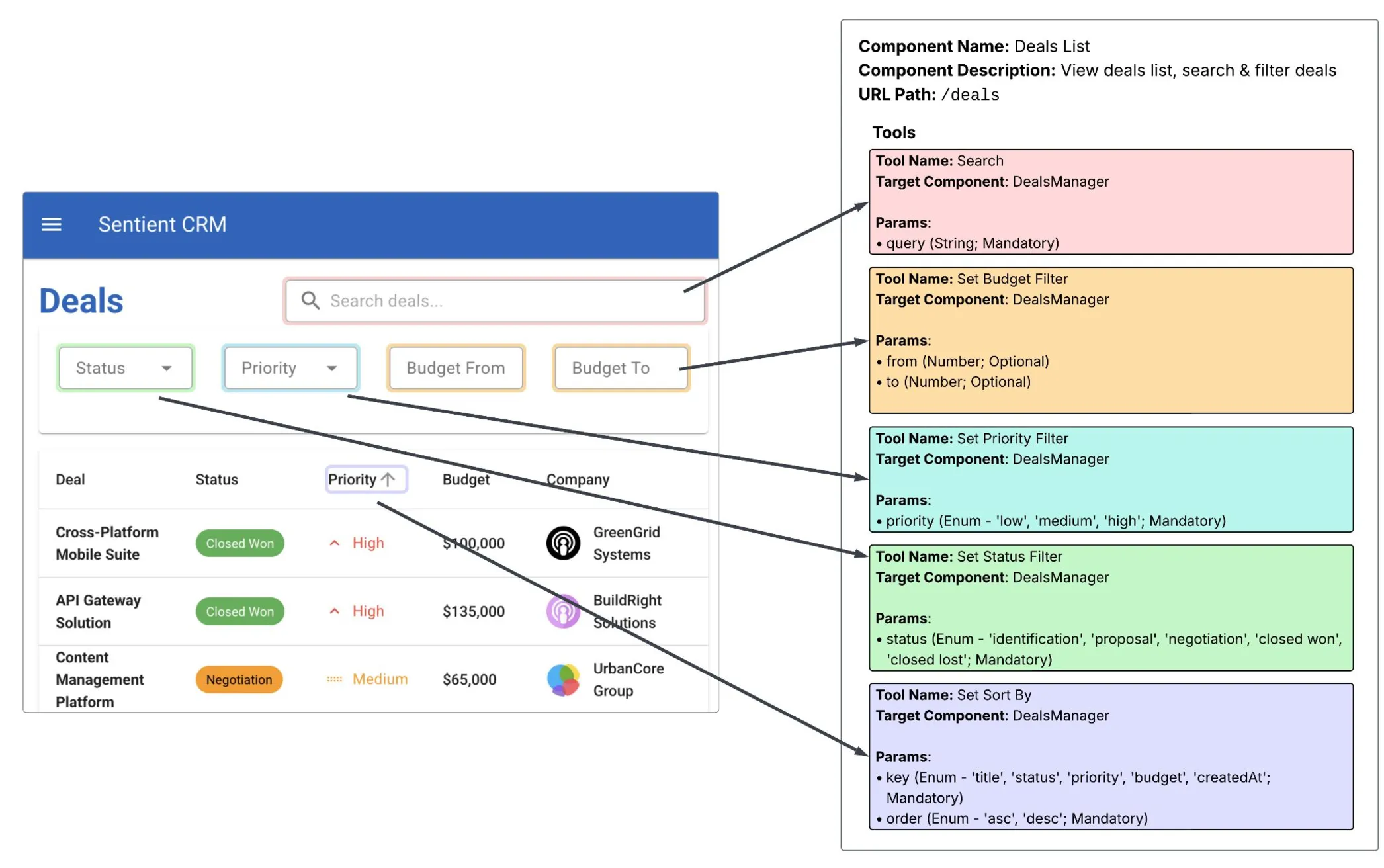
The architecture:
Component instrumentation. Each React component registers with the voice system via useVoiceAgent(). It provides: a unique ID, a description of what it does, and a list of callable tools. The Deals List component exposes Search, Set Budget Filter, Set Priority Filter, Set Status Filter, Set Sort By. Each tool has typed parameters.
Two context levels. LocalContextService builds the dynamic context: what’s visible right now, what actions are available. GlobalContextService provides the static sitemap: where you can navigate, what exists elsewhere in the app. The agent gets both.
Voice to execution plan. User speaks. Deepgram transcribes. The coordinator sends transcription + context to Gemini. Gemini returns a structured execution plan: a list of tool calls with target components and parameters.
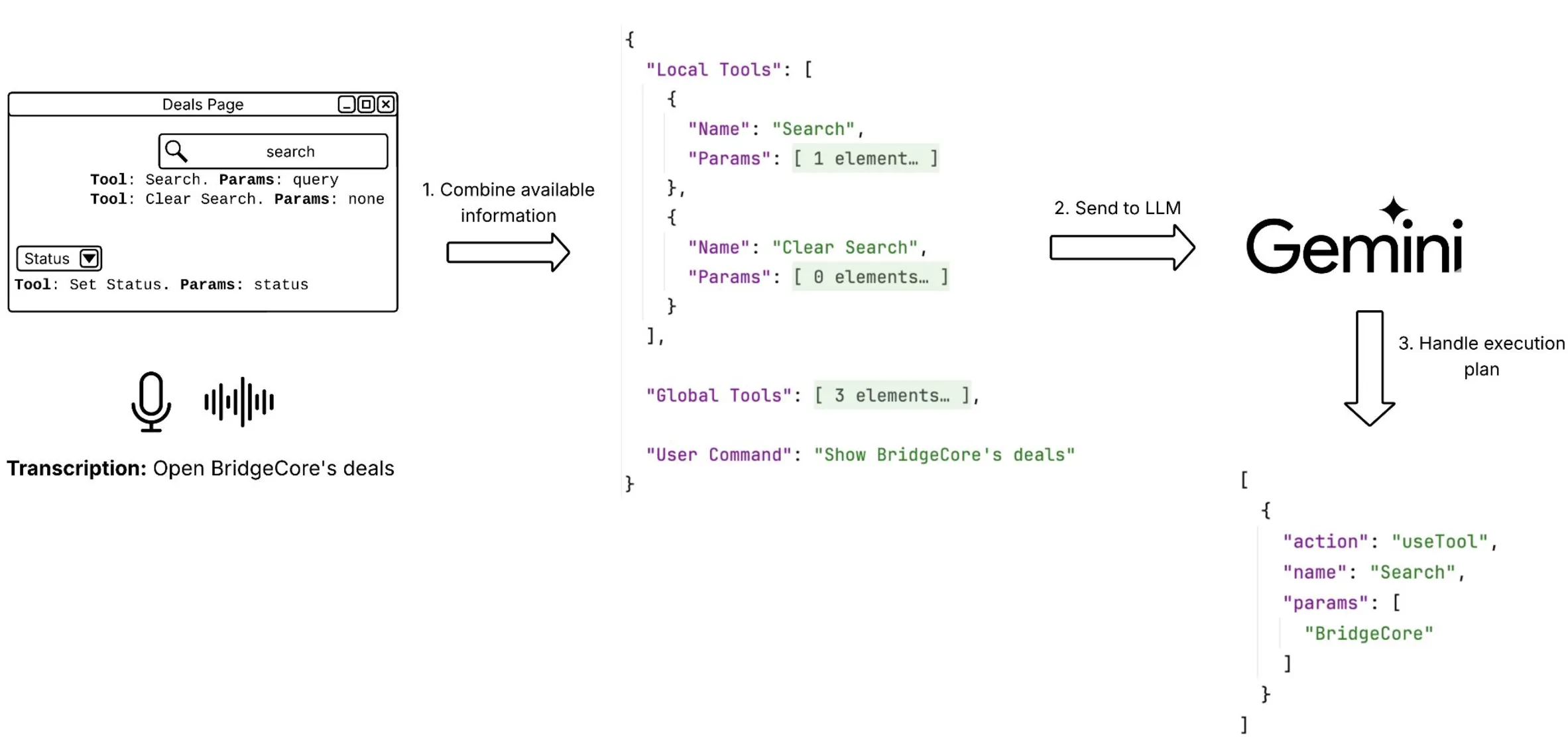
The LLM output looks like this:
[
  {
    "action": "useTool",
    "payload": {
      "tool": "switchToEditMode",
      "targetComponent": "deal-details"
    }
  },
  {
    "action": "useTool",
    "payload": {
      "params": ["budget", "100000"],
      "tool": "changeField",
      "targetComponent": "deal-edit"
    }
  }
]
The agent executes the plan directly: clicking buttons, filling fields, navigating. No typing. No prompt engineering from the user.
Commands that worked: “Open BridgeCore’s deals.” “Filter by high priority.” “Change the budget to 100k.” “Show me closed won deals from last quarter.”
Any system can be instrumented this way. The agent layer sits on top of existing UI. Doesn’t replace it.
You don’t need to rebuild your app as a chat interface. You add an agent layer that understands your current interface and acts on it. The coherent UI remains. The agent makes it responsive to voice and intent.
The Three Protocols You Need to Know
The 2026 agentic stack has three protocols. Each solves a different problem. They’re complementary, not competing.
MCP: Agent Gets Data
Model Context Protocol handles agent-to-tool connectivity. The agent calls a tool, gets structured data back. Stateless. No session memory. The tool doesn’t know what you asked before.
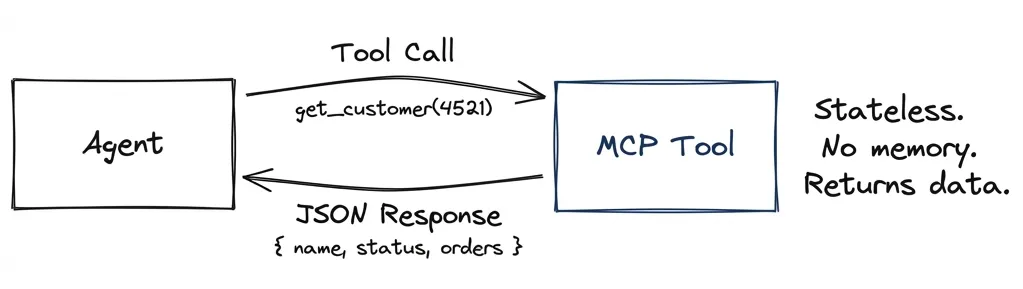
Agent: "Get customer #4521"
Tool: { name: "John Smith", status: "active", orders: 47 }
The agent decides what to do with the data. The client decides how to display it. MCP doesn’t care about UI. It’s just a data pipe.
A2A: Agents Collaborate
Agent-to-Agent handles autonomous systems working together. Unlike MCP’s stateless calls, A2A maintains conversation context across interactions.
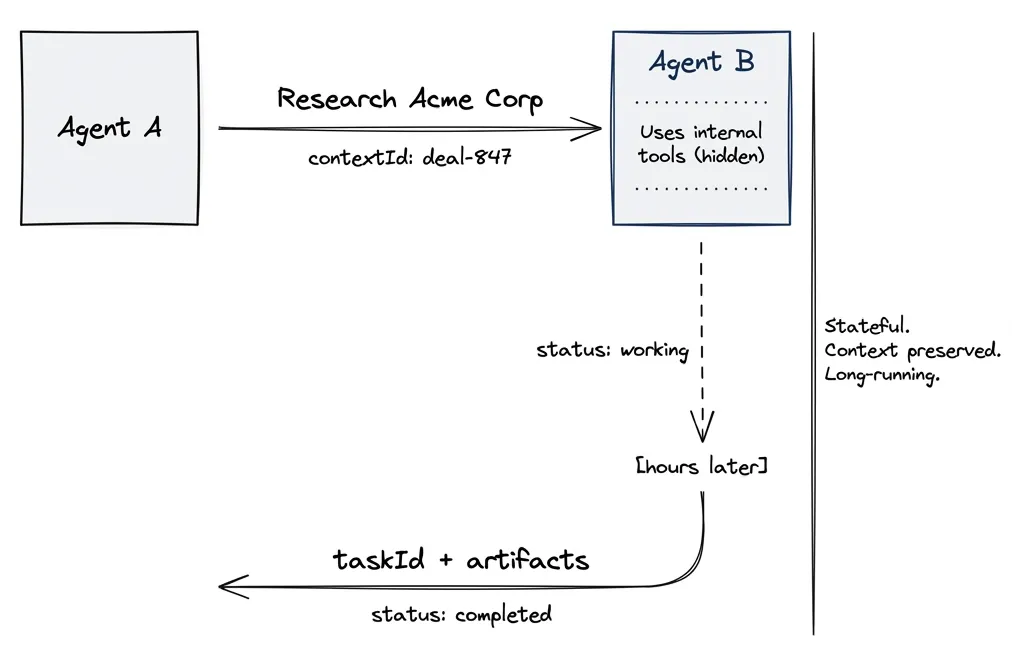
The key difference: A2A uses contextId and taskId to maintain state. The receiving agent remembers what was discussed. Tasks can run for hours or days, with the client polling for updates or receiving push notifications.
Here’s what surprised me when I dug into this: A2A agents expose skills, not tools. A skill is an autonomous capability. The agent might use dozens of internal tools to fulfill it, but you don’t see that. You ask “research this company” and get a result. How it got there is opaque.
Agent A → Agent B: "Research Acme Corp for acquisition fit"
  contextId: "deal-review-847"

Agent B: working... (checks CRM, news, financials internally)
  taskId: "research-001"
  status: "working"

[hours later]

Agent B → Agent A:
  status: "completed"
  artifacts: [{ analysis: "Strong fit. Revenue growing 23% YoY..." }]
Agents collaborate without sharing internal state. They negotiate based on declared capabilities. This is how you build multi-agent systems that span organizations.
A2UI: Agent Renders Interface
Agent-to-User Interface handles agents showing things to humans. The agent outputs declarative JSON describing components. The client renders them natively.
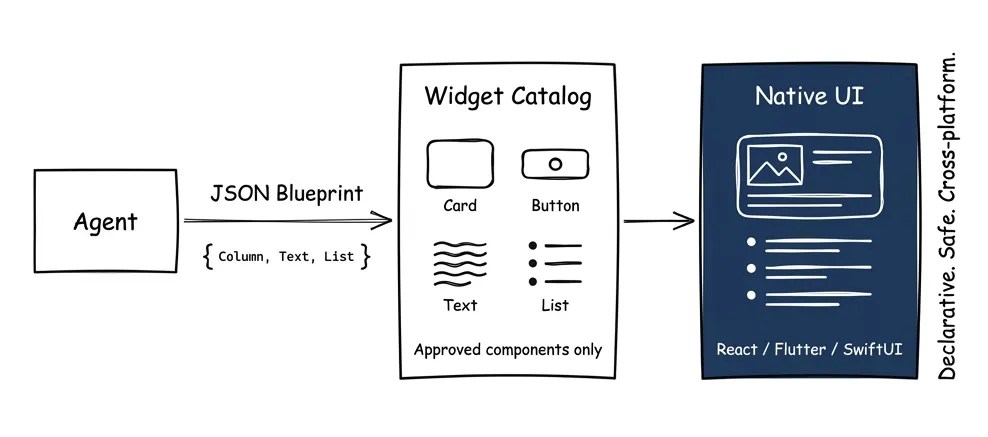
{
  "updateComponents": {
    "surfaceId": "main",
    "components": [
      { "id": "root", "component": "Column", "children": ["header", "deals"] },
      { "id": "header", "component": "Text", "text": "Your Deals" },
      { "id": "deals", "component": "List", "items": "{{deal_list}}" }
    ]
  }
}
The client maintains a catalog of approved widgets: Card, Button, TextField, List. The agent can only use what’s in the catalog. No arbitrary code execution. Safe like data, expressive like UI.
Why this matters: the agent doesn’t send HTML. It sends a blueprint. Your React app renders it as React components. Your Flutter app renders it as Flutter widgets. Same agent output, native rendering everywhere.
How They Work Together
A realistic flow uses all three:
- A2A: Your agent asks a specialist agent to research a customer
- MCP: The specialist agent calls tools (CRM lookup, news search, financial data)
- A2UI: Your agent renders the results as a native card in your app
The protocols are layers, not alternatives. MCP gets data. A2A coordinates work. A2UI shows results.
Vercel AI Elements has React components that implement A2UI patterns: message threads, reasoning panels, response actions. Install via npx ai-elements@latest. You don’t have to build the plumbing from scratch.
The Decision Framework
How do you know what stays coherent and what becomes disposable?
Reproducibility test. If you’d need to show someone exactly what the user saw (for an audit, for debugging, for training) it needs to be coherent. Dynamic generation breaks accountability.
Collaboration test. If multiple people need to look at the same thing and talk about it, that thing needs to be stable. “Look at row 3” doesn’t work if everyone’s view is personalized.
Frequency test. If users do it fifty times a day, changing it costs them. Muscle memory is real. The homepage, the main nav, the core workflow: leave those alone.
Variation test. If the answer depends entirely on who’s asking and when, generate it. “Show me my at-risk deals” is different for every rep, every day. No point designing a static page for that.
Most features fail one test and pass another. A deal dashboard might be coherent (team collaboration) but with disposable detail panels (variation by context). The skill is decomposing features into stable shells and flexible contents.
Front-End Composability: What Actually Changes
Nate’s analysis gets this right: front-end engineering as pixel-pushing is ending. Front-end as system design is starting.
The old job: take a Figma file, implement it in React, ship the page. Repeat for every page. Every company building the same tables, modals, and forms from scratch.
The new job: design the primitives. Build the widget catalog. Define what can be composed and how. Then let agents (and junior devs with AI assist) assemble pages from your building blocks.
What this looks like in practice:
If your components have good metadata (what they do, what props they accept, what states they can be in) an agent can use them. My voice UI demo works because every component has a description. The agent reads the tree and knows “this is the customer panel, it shows name and status, I can update the status field.”
If your components are black boxes with no introspection, agents can’t work with them. The beautiful hand-crafted interface becomes a liability. It looks great but it’s opaque.
The uncomfortable implication:
Your design system becomes more important than your designs. The catalog of approved widgets, the schemas they accept, the brand constraints they enforce: that’s the durable work. Individual pages are increasingly generated.
This doesn’t mean designers disappear. It means they work at a different level. Less “design this screen,” more “define what screens can be.” Less art direction per page, more governance across thousands of generated pages.
Same shift for engineers. Less “build this feature,” more “make this feature composable.” The components need to be agent-addressable: readable state, invocable actions, clear metadata. You’re building an API for the agent layer, not just a UI for humans.
The products that win will be schema-clean, composable, agent-addressable. The products that lose will have one moat: a beautiful interface that agents can’t work with.
Where does classical front-end still happen? High-polish consumer products. Mission-critical high-traffic surfaces. Heavily regulated domains. There’s a two-class world emerging: the Rolex and Bentley of handcrafted sites, and the utilitarian composable rest.
What’s Next
Part 4 covers MCP: how agents get the data and tool access that makes hybrid interfaces work. Because the best UI in the world can’t help if the agent can’t reach your systems.
The shift isn’t chat replacing interfaces. It’s interfaces becoming responsive to intent. Coherent where stability matters. Generated where flexibility helps. Always with the agent orchestrating what happens next.