I pulled down a git repo, fired up Claude Code, and asked a single question.
$ git pull
$ claude
> What have we done in ad tech that involved real-time bidding optimization?
Thirty seconds. That’s it.
Three relevant case studies. The technologies we used. Outcomes. The people who owned them. Everything I needed to walk into a conversation credible and prepared.
This isn’t a fancy RAG system. It’s not some $50k platform bolted onto your CRM. It’s markdown files in a git repo. Text. Queryable by AI agents that’re improving faster than anything else in software right now.
I know what you’re thinking — that sounds weird. Your portfolio isn’t code. But AI coding agents don’t care. Claude Code, Cursor, all the systems everyone’s racing to improve — they don’t distinguish between code and content. They read files. They search directories. They navigate change histories. They’re the most capable, rapidly improving tools we have access to. Every major AI company is pouring billions into them because they see code as the path to AGI. We get to consume that improvement for free. Almost.
And we’re barely using it.
Your sales knowledge should be queryable. Can you ask “what have we done that’s relevant to this prospect?” and get an answer in thirty seconds? If not, you’re scrambling through emails before the call. Hunting through Notion. Hoping someone remembers. Meanwhile, your competitor just pulled up context in half a minute.
This is fixable. In thirty minutes.
Compare that to what you’re probably doing now. Traditional sales enablement platforms run $20k to $120k per year. Your team spends ten hours per week — a full day — hunting for materials across platforms that were never designed for actual search. Six figures and people still drowning.
With this approach? Thirty minutes setup. Free tier. Your portfolio becomes something an AI agent can actually understand and retrieve from. Your team gets answers faster. Your conversations start smarter. And you’re just organizing what you already know.
The Problem
Our portfolio lived in PDFs, slide decks, and the heads of project managers.
When I needed to prep for a call, I’d ask around: “Hey, did we do anything with streaming video? Who worked on that?” Sometimes I’d find something. Sometimes I’d miss cases we actually had. We had everything. We just couldn’t find it.
Enterprise solutions promise to solve this. Seismic, Highspot, Showpad — they’ll consume sales budgets, and they’re not wrong about the problem. Users complain about information overload. They can’t find what they need during live calls. One Head of Sales told me: “If your reps have to leave the CRM to learn something, you’re already losing them.”
He was right. Every second spent searching is a second you’re not selling.
But here’s the trap. These platforms assume you’ve already won half the battle. They’ll organize your data beautifully — once it’s structured. They’ll surface the right case study at the right moment — once it’s indexed and tagged. They’re built for companies that have already solved the access problem.
We hadn’t.
Everyone talks about AI for sales enablement. But the tools assume you have structured data. We had Google Drive folders and scattered knowledge. Before you can use AI, you need to make your knowledge readable. So we stayed stuck. Sales reps digging through folders before calls. Knowledge scattered across systems. The AI tools everyone said would help? They needed something we didn’t have: a single source of truth.
Not a database. Not a SaaS platform. Just files they could actually read.
The Transformation
Thirty minutes.
That’s what I spent on the thing that probably changed how we sell more than anything else we did that year. I was prepping notes for a customer call and thought: instead of solving the infrastructure problem — buying software, setting up integrations, training the team — what if I just made the raw material usable?
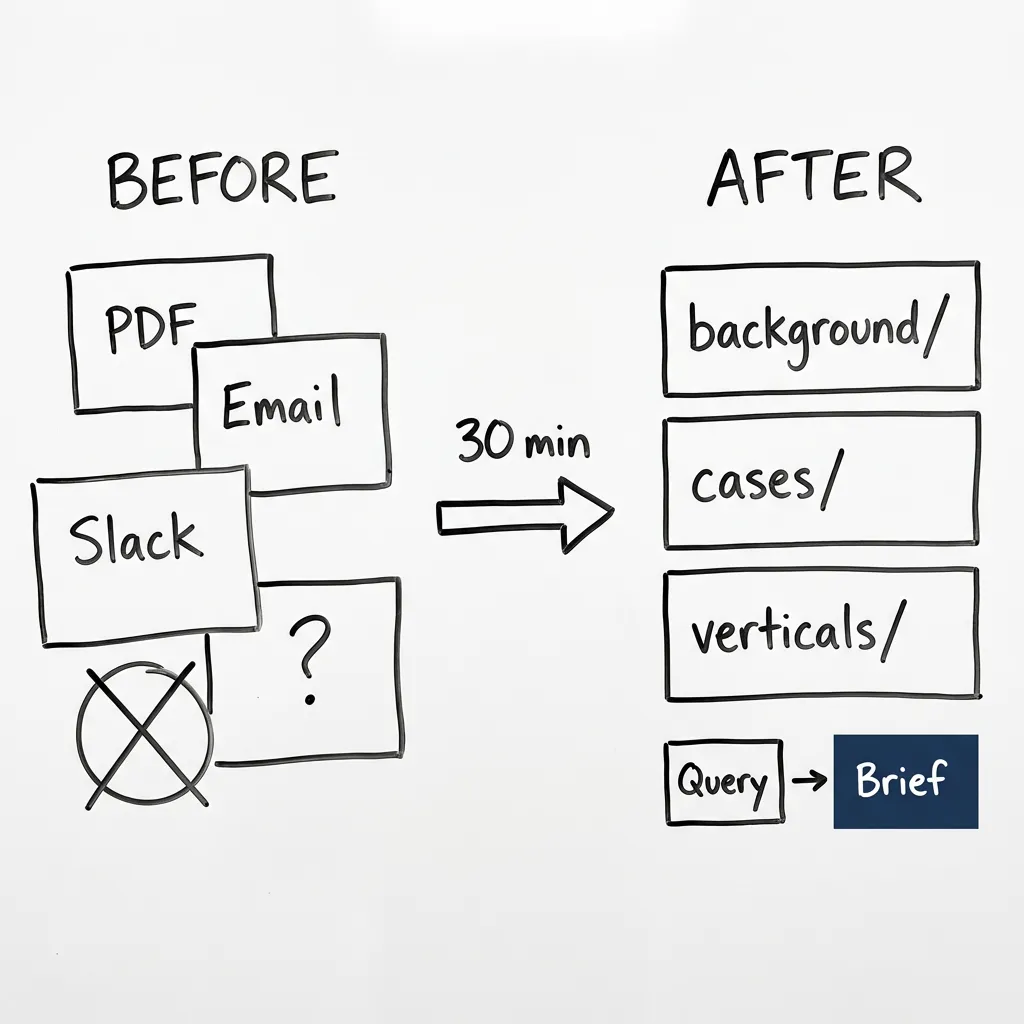
I downloaded PDFs from all our sources. Wrote an initial prompt. Asked Claude Code to improve it. Ran it in parallel — 5 to 7 minutes for 50+ case studies. Didn’t like the quality. Improved the prompt. Reran. Had it generate an index file too — one-line summary of each case study for quick lookups. Pushed to git.
That’s it.
No engineering. No vendor. No six-month implementation. Take what you have. Make it readable. Let AI do the work.
This was August 2025, when Claude had just released sub-agents. I could spin up multiple tasks at once to get through the whole stack fast. Today it’s even easier — Claude Code and Claude Cowork both handle this out of the box. You tell it what you want done. It does it.
The real shift wasn’t technical. It was deciding that your portfolio shouldn’t hide. Your team shouldn’t have to leave a call to find what you’ve built. That 30-minute setup was worth closing the gap between what you can do and what you can prove.
The Structure
69 files. That’s the whole thing.
Background folder has 12 files: adtech context, sector-specific technical deep dives, client summaries by vertical. Keeps everything one level of abstraction above individual case studies. Then 51 case studies in a standard format — one per file. Then 6 vertical rollups that pull it all together. Useful when someone asks “What do we know about healthcare?”
The naming convention does the structural work: {vertical}-{client}-{what-we-did}.md. No taxonomy system. No tags. Just names that tell you what’s inside.
Every case study follows the same template — YAML frontmatter for machine-readable metadata, then structured sections:
---
client: Donor Drive
industry: Non-profit/Fundraising
technologies: [Flutter, Firebase, iOS, Android]
project_duration: Discovery phase + Development
team_size: 3
project_type: Mobile App
categories: [mobile, nonprofit, cross-platform]
---

# Donor Drive - DonorDrive Mobile App

## Executive Summary
[2-3 sentences on what we built and why it mattered]

## Challenge
[What they faced — specific pain points]

## Solution
[What we did — technical approach, key features]

## Results/Impact
[Outcomes — metrics where possible]

## Key Learnings
[What we'd do differently]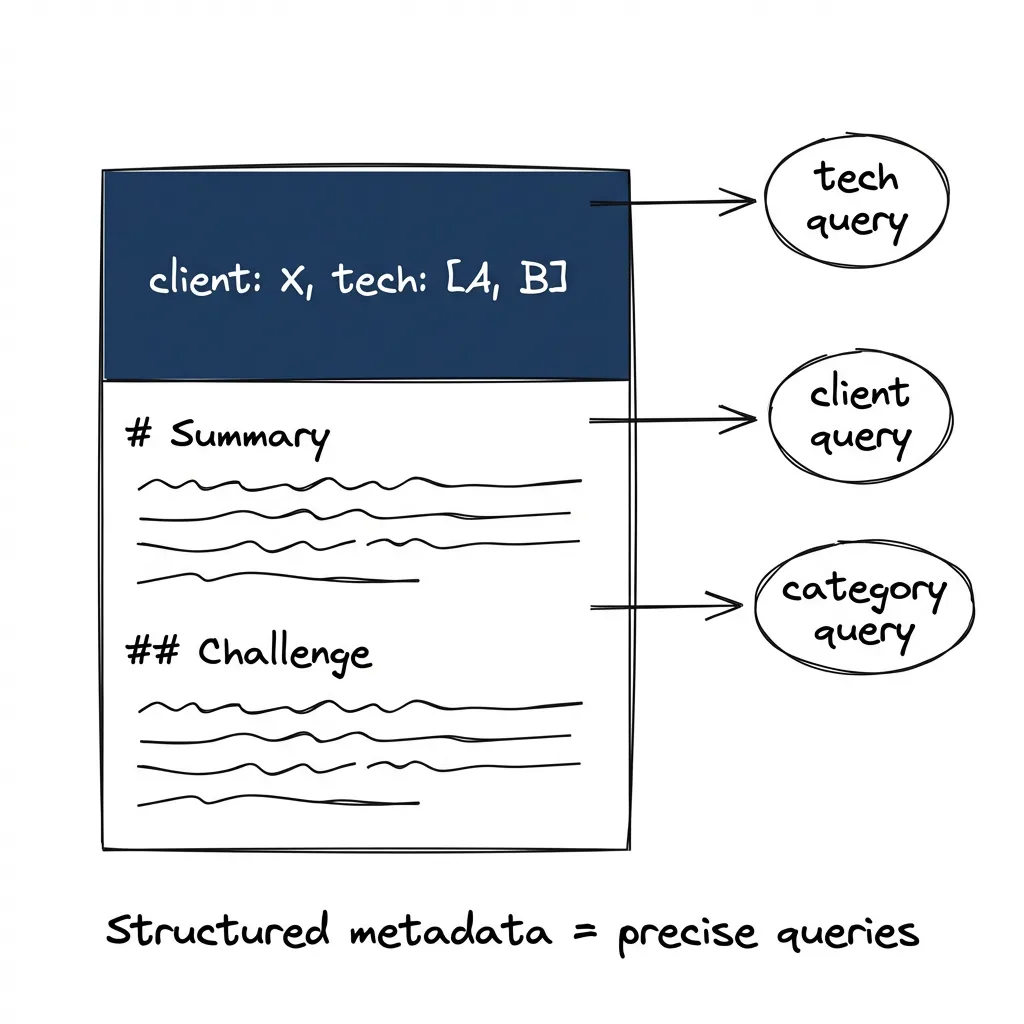
The YAML frontmatter is the schema. When I ask “Which projects used Flutter?”, Claude doesn’t have to parse prose — it reads the technologies array directly. When I ask “Show me our mobile projects”, it filters on categories. Structured metadata makes queries precise.
And here’s what makes this maintainable. If I realize a case study is missing context, I just tell Claude. “By the way, the team was 3 people and one of them was a part-time ML developer who did the PyTorch model.” It updates the frontmatter and body correctly. Resolves conflicts. No manual editing. No reformatting. Just conversation.
What Becomes Possible
Most queries fall into a few patterns. “What DSP projects do we have?” or “Which case studies mention real-time bidding?” Simple stuff.
But you can go deeper.
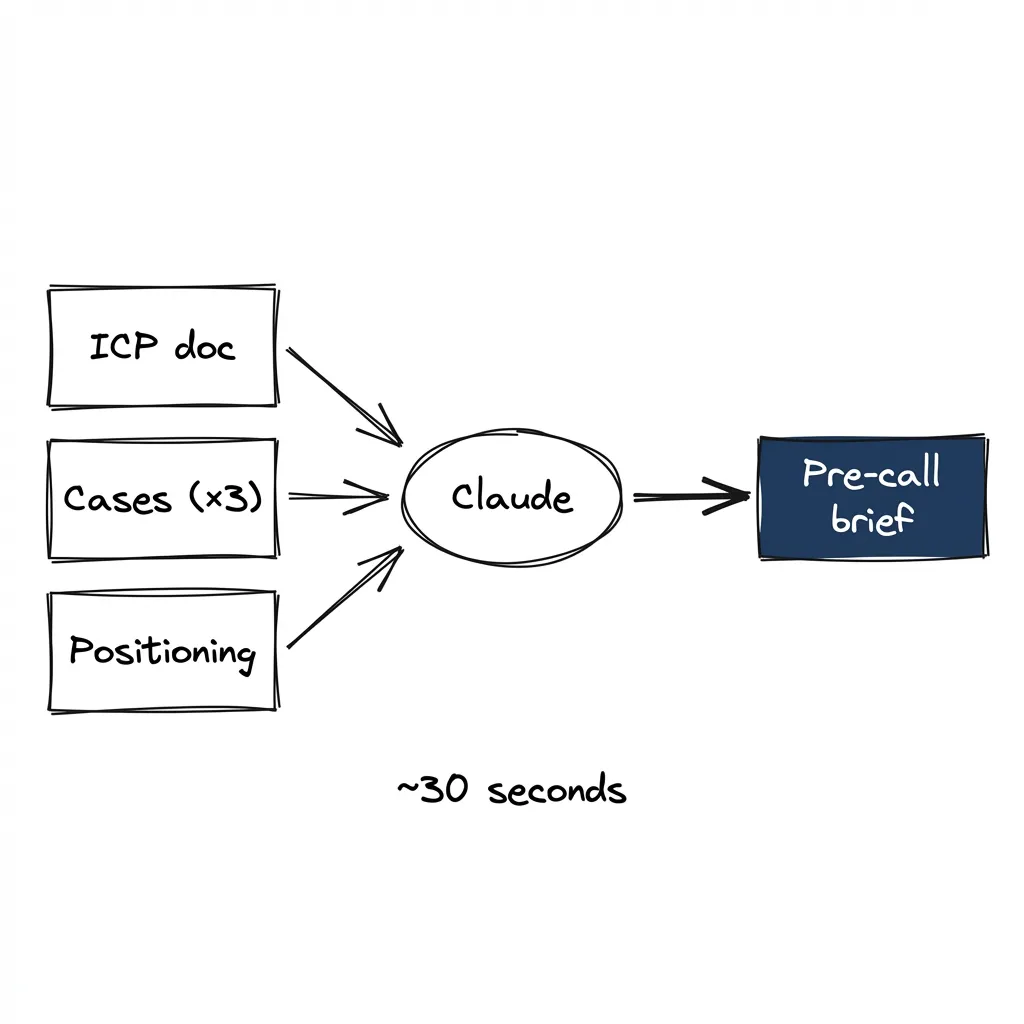
“I have a call with a DSP — what should I know?” The agent reads your ICP file. Pulls relevant case studies. Surfaces objections you should expect. Pre-call brief writes itself. Well, not exactly — I still think. Still ask follow-up questions. But I’m not starting from zero.
“Which of our projects used Kafka?” The agent scans every case study. Finds matching technologies. Three seconds of context instead of three hours of digging.
Does this feel too simple? It is. That’s why nobody’s doing it.
“Summarize our manufacturing experience for someone who doesn’t know the industry.” The agent synthesizes across five case studies. Pulls out patterns. Gives you positioning you can actually use in a call.
“Give me our mobile projects but exclude the ones where we just did maintenance.” The agent doesn’t need a retrieval system — it just reads the files, synthesizes, responds.
This works because of scale. We have 70 files. They fit in a single context window. No fancy retrieval, no optimization — just read everything and answer. Even at 200-300 files, Claude Code handles it fine if you have an index. We generate a case-studies-index.md as part of the PDF transformation — a one-line summary of each case study. Claude reads the index first, then pulls the full files it needs.
You’d be surprised how far this scales before you need real retrieval.
The ICP Files
This extends beyond case studies. We maintain ICP profiles for each target market:
# ICP: Ad Tech - DSP

## Profile
- Size: 50-500 employees
- Stage: Series B+
- Geography: US HQ

## Pain Points
- Bid optimization at scale
- Data pipeline reliability
- Privacy compliance

## Buying Triggers
- New privacy regulation
- Scaling issues visible in job postings
- Engineering leadership change

## Our Angle
- Relevant cases: [list]
- Technical edge: [specifics]

## Common Pushbacks
"Why not hire a team in-house?" The answer isn't "we're cheaper" — it's "you stay focused on your product, we handle the complexity."

"You're based in Ukraine. What if geopolitics gets weird?" Fair question. We have contingency documentation showing exactly how we'd transfer knowledge and maintain continuity. (We've never needed it, but I've shown it five times.)

"We already built something similar." True, probably. "But you're maintaining it while we're getting faster at our specialty." That's the real difference.
When I ask Claude “I have a call with a DSP — what should I know?” — it reads the ICP file. Pulls relevant case studies. Surfaces the objections I should expect. Not from a template. From real conversations we’ve had.
That’s the pre-call brief.
The Tooling
Claude Code. That’s it.
No CLAUDE.md. No system prompt. No complex configuration. You install it, point it at the folder, ask questions. Entire setup. For a sales team doing 50 queries per day, the free tier handles it. Deploy this to everyone’s machine at zero cost.
If your team isn’t comfortable with terminals, Claude Cowork does the same thing visually. Same capability, no command line. I’ve watched non-technical salespeople query their entire portfolio through the interface and get useful answers in seconds.
I burned three days trying to set up a proper RAG pipeline. Turns out the solution was “put it in markdown and ask Claude Code.”
Sometimes the best infrastructure is no infrastructure.
What Doesn’t Work
Be honest about the limits. This isn’t a silver bullet.
Scale beyond 200-300 files: We’ve got roughly 70 files right now. They fit in context. If you’re pushing 500 case studies, you need retrieval. Files alone won’t fit and the model won’t have the attention bandwidth to synthesize them properly.
Stale markdown: You have to actually keep the files updated. A stale markdown portfolio is as bad as stale PDFs collecting dust. We update after every project closes. Not committed to that? This won’t work.
Garbage input: If your case studies are vague (“helped customer achieve success”), the answers are vague. If they’re specific — customer burned $200k/month on manual processes, we cut it to $30k/month, deployment took 6 weeks — Claude gives you something you can actually use in a call.
The fix is easy though. Talk to it. Voice transcription, quick note: “By the way, the team was 3 people and the deployment took 6 weeks.” Claude updates the file correctly. Much less friction than manual editing.
Hallucination: Claude may occasionally say things that aren’t in your files. Honestly? Not as bad as I expected. Code-agent interfaces show their work. You can see which files it’s reading. If you want guardrails, a simple CLAUDE.md file helps:
When answering questions about our portfolio:
- Only cite information from files in this directory
- If you can't find relevant experience, say "I don't have that in our portfolio"
- Always mention which case study you're pulling from
Three lines. Now it declares its limits instead of making things up.
The Point
Represent your marketing and sales knowledge as text-based, queryable files.
AI coding agents are the most capable, most rapidly improving tools we have. They’re built for code but they work on anything that’s text. Your portfolio is text.
Convert your knowledge to markdown. Let Claude Code help you organize it — dump things in consistently, let it analyze and restructure. Query it when you need answers. Thirty minutes to start. No configuration. Free tier is enough.
When I show up to a call knowing your world — your pain points, your constraints, your history with similar problems — it’s because I queried my own knowledge first. The AI made me more prepared. Not more automated. I still think. I still synthesize. I still ask follow-up questions.
But I’m not starting from zero.
That’s what AI for sales should look like. Not replacing you. Amplifying you.
Do this today.